Form validation
This action checks a condition defined by a rule. The condition is met if the rule returns "POSITIVE", "1", or "TRUE" — any other value means the form data is treated as invalid.
Basic configuration
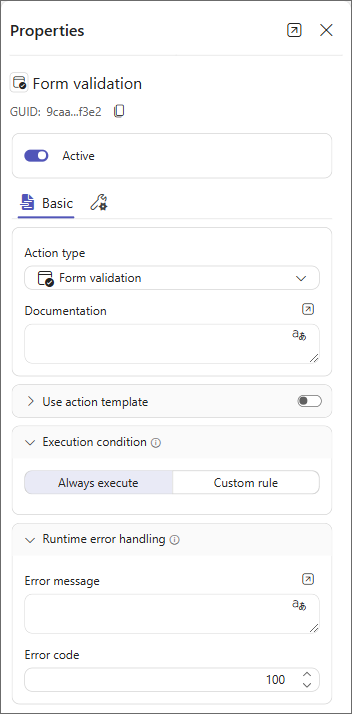
The Basic tab of the Properties panel holds settings shared by every action in an automation: the Active switch, the Action type field, the Documentation field, the Use action template switch (when enabled, the action takes its configuration from the selected action template defined in the process), the Execution condition section (decides whether the action always runs or only when a custom rule is met), and the Runtime error handling section (the message and numeric error code returned when the action fails). Since these settings are not unique to the Form validation action, they are described in detail in the Actions chapter.
Advanced configuration
The Advanced tab holds fields specific to this action: Validation rule, Message in case of error, and Message in case of success.
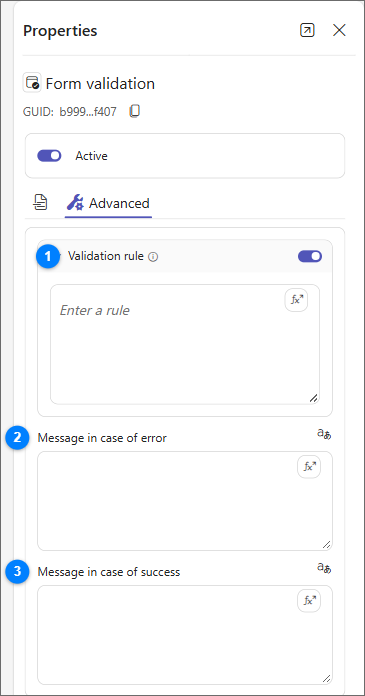
1. Validation rule
The field lets you define a condition that verifies whether the data entered on the form is valid. The rule should return "POSITIVE" (or "1"/"TRUE") when the data is valid — any other value means the form data is invalid.
- If the data is invalid, the user sees the message defined in the Message in case of error field.
- If the data is valid, the message defined in the Message in case of success field is saved to the action's execution status.
The Validation rule field is a collapsible section with a switch in its header, which is disabled by default. The rule is defined once the switch is enabled. Clicking the fx icon opens a full-screen rule designer — a visual, drag-and-drop formula editor with tabs on the right.
2. Message in case of error
The message shown to the user and saved to the action's execution status when the Validation rule returns anything other than POSITIVE/1/TRUE. The content can be defined per interface language using the Translations button.
3. Message in case of success
The message saved to the action's execution status when the Validation rule returns POSITIVE/1/TRUE.
For more information, see: The "Validate form" action on our technical blog.