Global definitions
Global definitions is a Designer Studio side panel section where you configure elements shared by the entire WEBCON system – independent of any single application or process. It contains elements that are defined once and used in many processes (e.g. constants, form fields, rules, automations, data sources, and connections), as well as settings that apply globally, such as the configuration of sending notifications, the e-mail template, business entities, and global permissions.
What global definitions are for
A global element is defined in one place and then used in any number of applications and processes. A change to its definition is applied everywhere the element is used – there is no need to repeat it in each process separately.
Some elements (e.g. constants, business rules, and form rules) can be defined at two levels:
- globally – in the Global definitions section; the element is available in all processes,
- in a process – in the Definitions node of the selected process; the element is available only within that process.
Global elements used by a process are transferred together with it when an application is exported and imported (see Application import and export).
Changing or deleting a global element affects all processes that use it. Before modifying an element, it is worth checking where it is used.
Opening the section
To open the section, click the Global definitions icon on the side panel icon rail. The icon is available both on the home page and in the application working window. When the section opens, the Global constants list is displayed by default.
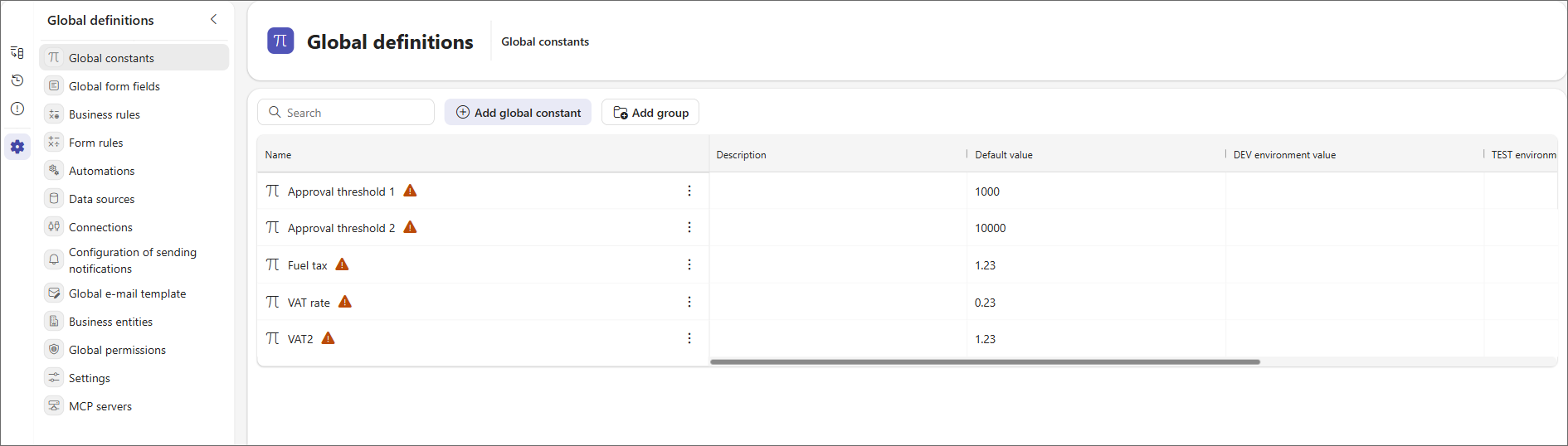
The view consists of:
- the side panel with the list of the section's nodes – the panel can be collapsed with the button next to the Global definitions header,
- the main working area, whose header shows the icon and name of the selected node, with the node's content below.
Section nodes
| Node | Description |
|---|---|
| Global constants | Values available in all processes, which can take different values depending on the environment (DEV, TEST, PROD). |
| Global form fields | Form fields defined once and placed on the forms of many processes. |
| Business rules | Global business rules that can be used in the configuration of any process. |
| Form rules | Global form rules that can be run on the forms of any process. |
| Automations | Global automations – sets of actions that can be embedded in many processes. |
| Data sources | All data sources defined in the system, grouped by type. |
| Connections | Connections to external systems used by data sources and actions. |
| Configuration of sending notifications | The mail server used to send e-mails, message signing, and notification forwarding. |
| Global e-mail template | Subject, header, and layout of e-mails sent by the system. |
| Business entities | Business entities in which workflow instances can be registered, together with permissions to them. |
| Global permissions | System administrator, business administrator, and auditor permissions. |
| Settings | Environment edit mode, business entities structure source, and the process database acronym. |
| MCP servers | Enabling MCP servers that expose tools to MCP clients: the general MCP server and the Designer Studio MCP server. Description of the application-specific MCP server. |
Working with element lists
The Global constants, Global form fields, Business rules, Form rules, Automations, Data sources, Connections, and Business entities nodes present lists of elements. Above each list you will find:
- the Search field – filters the list by the text entered,
- a button that adds a new element (e.g. Add global constant, Add business entity),
- the Add group button – available for constants, rules, and automations; it lets you organize elements into groups.
Clicking a row opens the element configuration in the Properties panel on the right. For elements that can be configured in full view, the Open configuration in full view icon is shown next to the name (the Back button returns to the list). The row Options menu (⋮) contains commands that depend on the type of element, e.g. Open configuration in full view, Open configuration in the side panel, a command that adds a new element, and a command that deletes it.
The Data sources and Connections lists are grouped by type – to display the elements of a given type, expand its group.
Elements marked on the list with a warning icon have their configuration available only in Legacy Designer Studio. When such an element is selected, the Properties panel shows the message Configuration available only in Legacy Designer Studio – its configuration can be viewed and edited only in the Legacy Designer Studio application.
Settings screens
The Configuration of sending notifications, Global e-mail template, Global permissions, Settings, and MCP servers nodes contain settings that apply to the whole system. The settings are grouped into sections, and changes are made directly on the screen (on some screens this is indicated by the Edit configuration. message above the settings). Many fields have an information icon (ⓘ) – clicking it displays a hint describing what the setting does.
Saving and publishing changes
Changes made to global definitions belong to the current editing session – just like changes to application configuration. A changed node is marked with a blue dot on the list of nodes, and the changes take effect only after they are published with the Publish changes button on the top bar.
Until they are published, changes can be reverted with the Undo last action button (see History) or discarded entirely with the Cancel edit button – after confirming in the Cancel editing? window, all unpublished changes are lost. Errors detected in the configuration of global elements are presented in the Configuration errors section and block publishing.
In Legacy Designer Studio, the elements corresponding to global definitions were available on the System settings tab. In Designer Studio they are grouped in the Global definitions section, while environment settings such as global parameters or authentication providers remain in the System configuration area.