Global constants
Global constants are values defined once for the entire system and available in all processes – unlike process constants, which can be used only in the process where they were defined. The value of a constant can depend on the environment (DEV, TEST, PROD), so moving configuration between environments does not require changing the value manually everywhere it is used.
The Portal address used in links in notification content differs between the test and production environments. Instead of entering the address directly in the configuration of each notification, you can define a global constant with separate values for each environment and use it in all processes. After the process is moved to the production environment, the constant automatically returns the address appropriate for that environment.
Global constants list
The list contains all global constants defined in the system. For each constant, the Name, Description, Default value, DEV environment value, TEST environment value, and PROD environment value columns are shown.
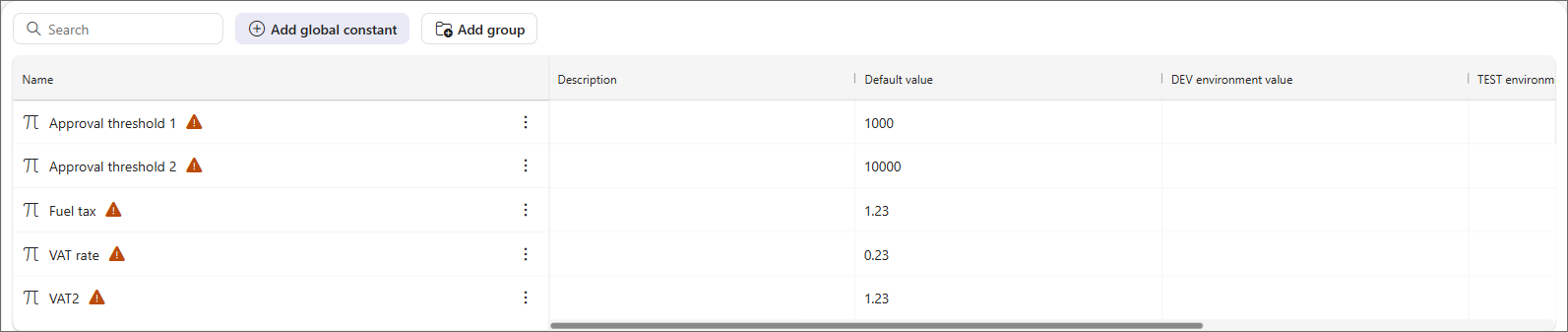
Above the list you will find:
- the Search field – filters the list of constants,
- the Add global constant button – creates a new constant named New constant and opens its configuration in full view,
- the Add group button – creates a group in which constants can be placed to organize the list.
The constant Options menu (⋮) contains the Open configuration in full view, Open configuration in the side panel, Add global constant, and Delete constant commands.
Constants marked with a warning icon have their configuration available only in Legacy Designer Studio – it can be viewed and edited only in the Legacy Designer Studio application. In Designer Studio, the values of such a constant can only be previewed on the list, and the constant itself can be deleted.
Constant configuration
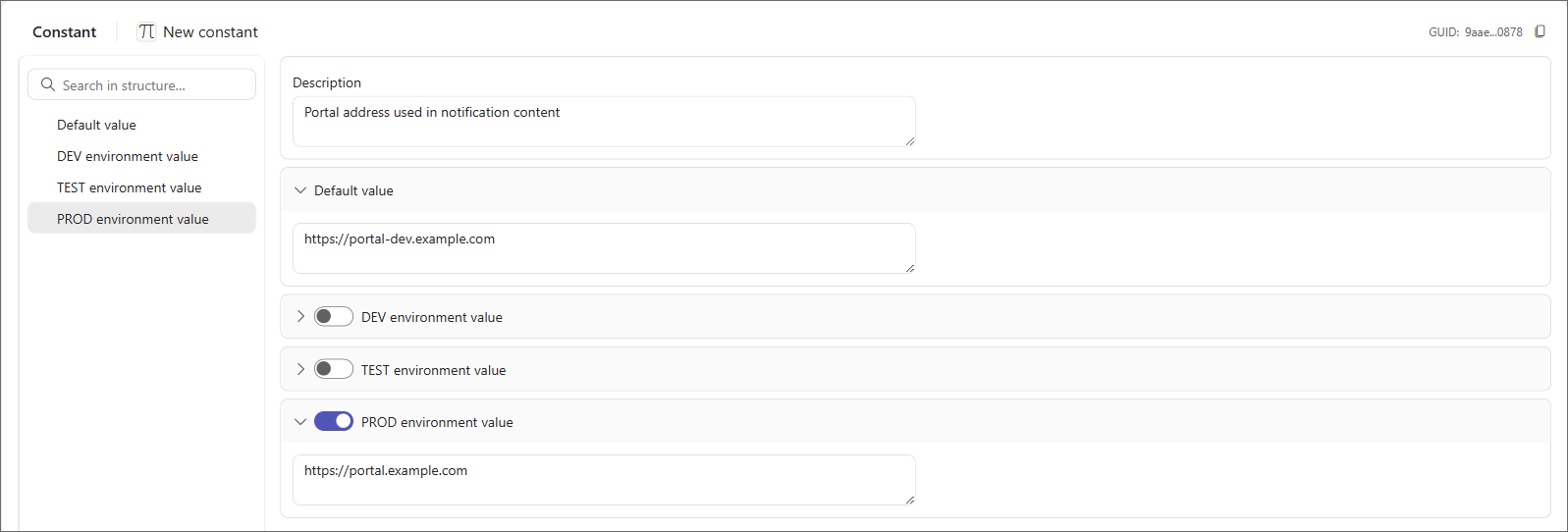
The constant configuration is available in full view and in the Properties panel. The full view header shows the constant name, which you can change by clicking it, and its GUID with a button that copies it to the clipboard. The structure tree on the left lets you quickly go to the selected section, and the search field above the tree finds a section by name.
| Field | Description |
|---|---|
| Description | A description of the constant's purpose that makes it easier to recognize on the list. |
| Default value | The value the constant takes in every environment for which a separate value has not been enabled. |
| DEV environment value | Once the switch is on, lets you enter the value the constant takes in the development environment (DEV). |
| TEST environment value | Once the switch is on, lets you enter the value the constant takes in the test environment (TEST). |
| PROD environment value | Once the switch is on, lets you enter the value the constant takes in the production environment (PROD). |
When an environment value switch is off, the constant returns the default value in that environment. Once it is on, the default value is ignored for that environment and the constant returns the value entered for the environment.
Using global constants
Global constants are available in all editors that use variables – among others, in the business rule, form rule, and SQL query editors. To insert a constant, go to the Values tab in the editor side panel and expand the Global constants group. While the workflow runs, the constant returns the value appropriate for the environment on which the configuration is executed.
A detailed description of inserting and presenting constants in editors can be found in the Variables article.