Global e-mail template
The Global e-mail template node lets you define the subject, header, and layout of e-mails sent by WEBCON, e.g. new task notifications. The global template is used in all processes in which the <Global template> template is selected in the notification configuration (see Process configuration).
The configuration is divided into two tabs: Template elements and Template.
Template elements
This tab contains the texts inserted into the e-mail template and the visibility settings of its predefined elements. Text fields have a translation button that lets you enter translations of the text into other languages.
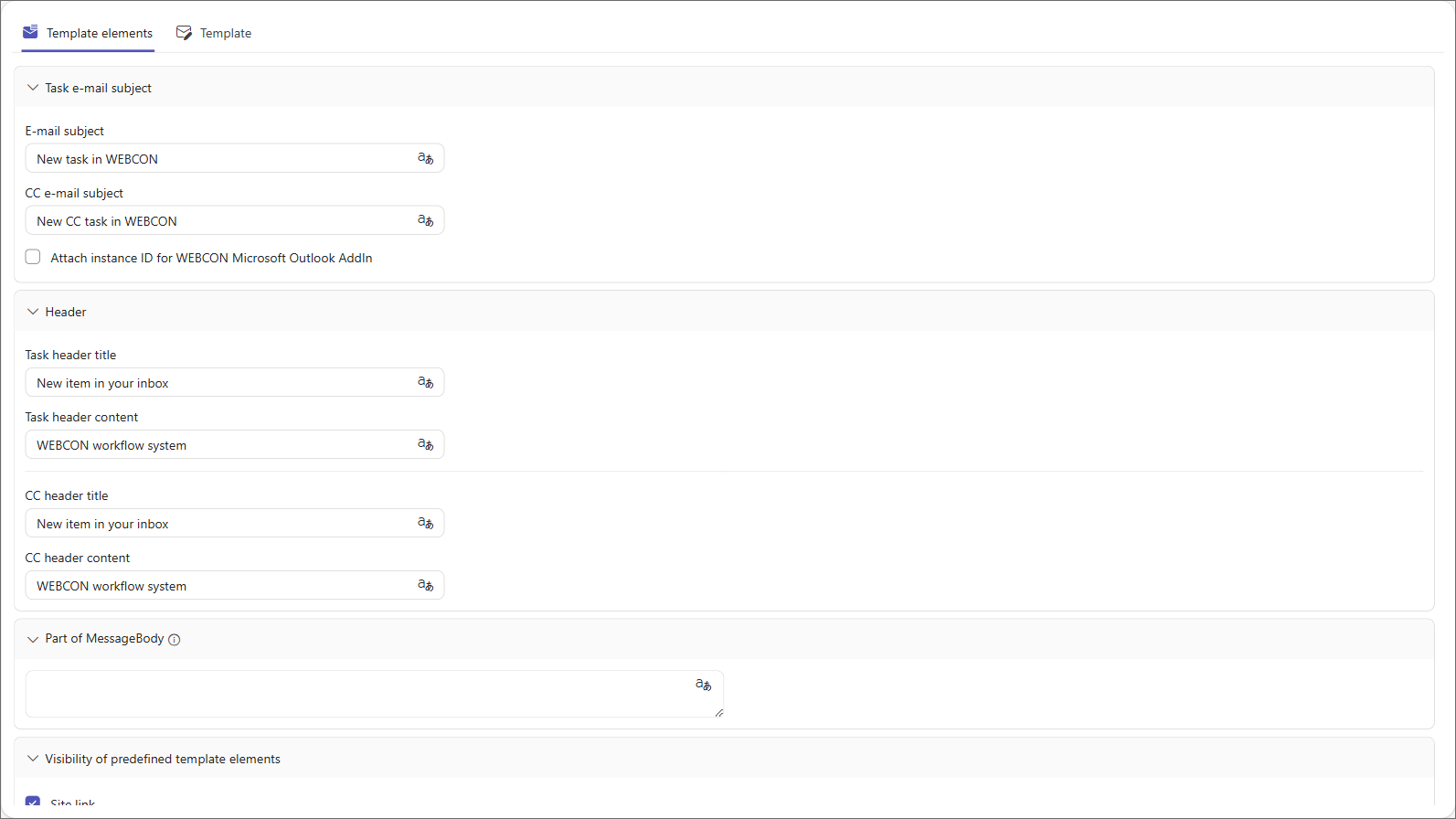
Task e-mail subject
| Field | Description |
|---|---|
| E-mail subject | The subject of the e-mail sent to the person assigned the task. |
| CC e-mail subject | The subject of the e-mail sent as a carbon copy (CC) to a person indirectly involved in the task. |
| Attach instance ID for WEBCON Microsoft Outlook AddIn | When checked, the instance identifier is added at the beginning of the e-mail subject, allowing the WEBCON for Microsoft Outlook add-in to associate the e-mail with the workflow instance. |
Header
| Field | Description |
|---|---|
| Task header title | The title of the e-mail header – inserted into the template in place of the [|HeaderMain|] tag. |
| Task header content | The text displayed below the header title – inserted in place of the [|HeaderSub|] tag. |
| CC header title | The header title of the e-mail sent as a carbon copy (CC). |
| CC header content | The text displayed below the header title of the e-mail sent as a carbon copy (CC). |
Part of MessageBody
The content entered in the Part of MessageBody field is sent in e-mails that use the template instead of the [|MessageBody|] tag. The content must be formatted as HTML.
Visibility of predefined template elements
The checkboxes determine whether the corresponding content is inserted in place of the matching template tags.
| Element | Tag | Description |
|---|---|---|
| Site link | [|WebAddress|] | A link to the WEBCON Portal. |
| Element link | [|ElementAddress|] | A link to the workflow instance the e-mail concerns. |
| Form field list | [|FormFields|] | A list of the instance's form fields with their values. |
| System fields | [|SystemFields|] | A list of the instance's system fields, e.g. signature, author, and creation date. |
| Recipients list | [|Recipients|] | A list of the original recipients of the e-mail. |
| Task details | [|TaskDetails|] | Task details defined in the configuration of the path that created the task. |
In the standard template, the site link should not be displayed together with the element link, and system fields should not be displayed together with the form field list.
Template
This tab contains the e-mail layout, in which tags (e.g. [|HeaderMain|], [|TaskDetails|], [|ElementAddress|]) are replaced when sending with the content specified on the Template elements tab.
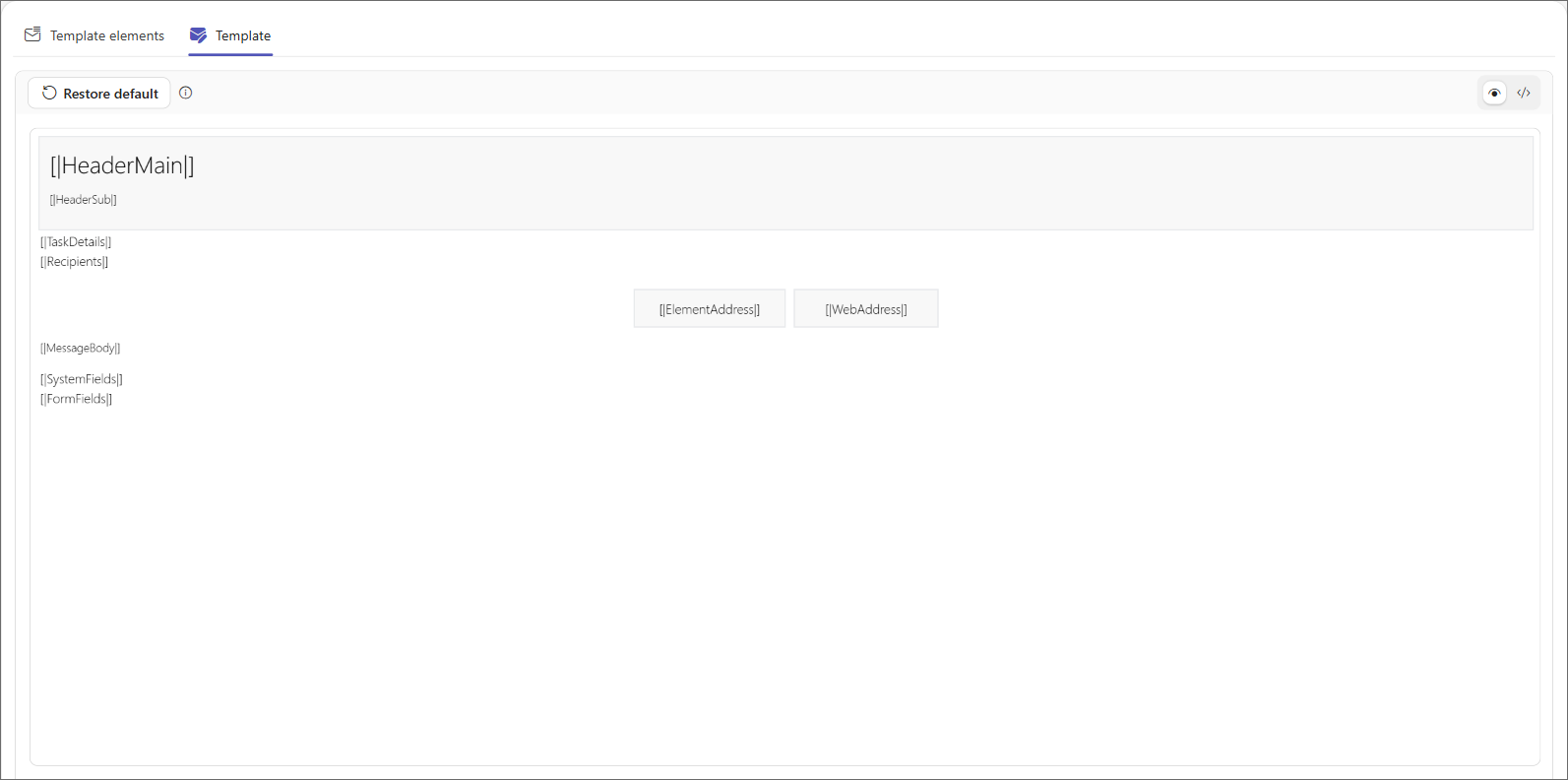
The template can be edited in two modes, switched with the buttons in the upper-right corner of the editor:
| Mode | Description |
|---|---|
| Visual editing mode | Editing the template in a view close to the final appearance of the e-mail. |
| HTML editing mode | Editing the HTML code of the template. |
The Restore default button restores the default version of the e-mail template provided with WEBCON.
The configuration of the global template in Legacy Designer Studio is described in the Global e-mail template article.