Configuration of sending notifications
The Configuration of sending notifications node lets you specify the mail server from which WEBCON sends e-mails (among others, task notifications and messages sent by actions), select the default certificate used to sign messages, and enable global notification forwarding for testing purposes.
The settings are grouped into the Server settings, E-mail signature, and Notification forwarding sections. Required fields are marked with an asterisk.
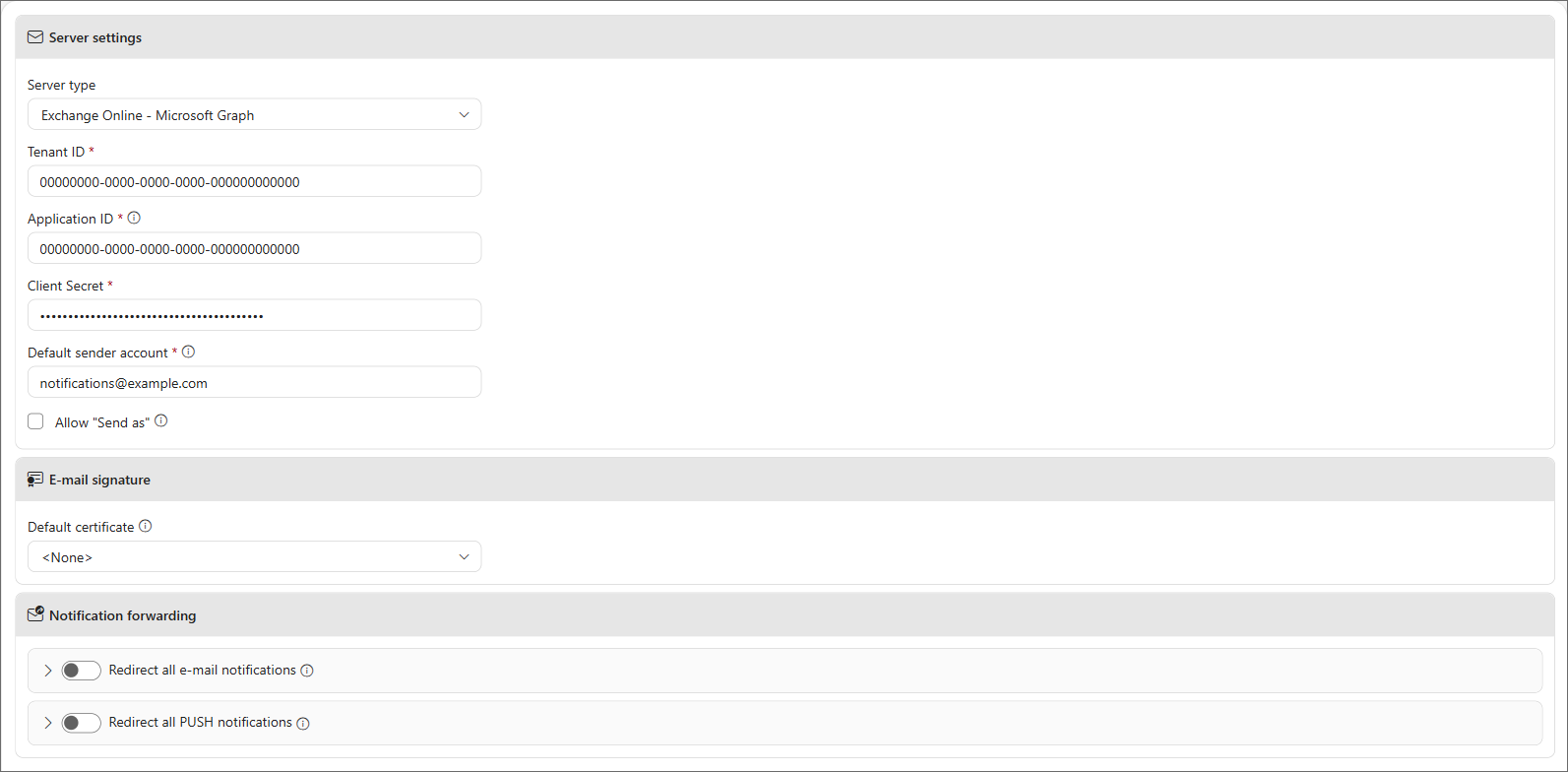
Server settings
The Server type field specifies the server from which system e-mails are sent. The selected value determines which fields are available in the section.
| Server type | Description |
|---|---|
| Exchange on-premises/SMTP Server | E-mails are sent through an on-premises Exchange server or any SMTP server. |
| Exchange Online - Microsoft Graph | E-mails are sent from Exchange Online through Microsoft Graph, using an application registered in the Microsoft Azure Portal. |
Exchange Online - Microsoft Graph
| Field | Description |
|---|---|
| Tenant ID | The identifier of the organization's tenant in the Microsoft cloud. |
| Application ID | The identifier of the application, which must be registered in the Microsoft Azure Portal. The application should have the Mail.Send application permissions to Microsoft Graph. |
| Client Secret | The client secret used to authenticate the application. |
| Default sender account | The User Principal Name or ID of the Exchange account used to send e-mails. |
| Allow "Send as" | When checked, lets you use non-default accounts for sending e-mails in process configuration – the Sender parameter in the configuration of the Send a custom e-mail action or in the e-mail notification template. Mailboxes or distribution lists with configured Send as permissions can be used as accounts. If the Sender parameter is left blank, the e-mail is sent from the default account. |
Exchange on-premises/SMTP Server
| Field | Description |
|---|---|
| Server address | The address of the server to which a connection is made in order to send e-mails. |
| Sender address | The e-mail address from which messages are sent. |
| Sender display name | The sender name shown to e-mail recipients. |
| Use authentication to send e-mail | When checked, e-mails are sent with authentication using the credentials from the Login and Password fields. When unchecked, the connection to the server is anonymous. |
| Login | The name of a user with access to the server. |
| Password | The user's password. |
| Port | The port of the mail service on the server. |
| Use SSL/TLS authentication | When checked, the connection to the server is encrypted using SSL/TLS. |
E-mail signature
The Default certificate field lets you select the certificate used to sign outgoing e-mails (<None> by default). WEBCON can sign:
- standard e-mails – signing is enabled in the process configuration,
- custom e-mails – signing is enabled in the action configuration.
The certificate selected here can be overridden in the process configuration (see Process configuration).
When the server type is Exchange Online - Microsoft Graph, the size of a signed e-mail including attachments cannot exceed 3 MB.
Notification forwarding
This section lets you enable deployment mode globally – in this mode, notifications sent by the system do not reach their actual recipients but are delivered to a specified recipient instead. This is useful during testing, e.g. on a test environment. Each option is turned on with a switch, and its settings are displayed after the option is expanded.
| Option | Description |
|---|---|
| Redirect all e-mail notifications | Enables deployment mode in every process. All e-mails sent by the system go to the recipient specified in the Recipient group – in the E-mail receiver and Recipient display name fields. A redirected e-mail looks like the one a system user would receive and contains the e-mail address of the person it would have been sent to outside deployment mode. |
| Redirect all PUSH notifications | Enables deployment mode in every process for PUSH notifications. All PUSH notifications sent by the system are delivered to the devices with the mobile app of the users specified in the Users field. The notification body matches what the recipient would receive, and its heading contains the phrase “[FW]”. |
Notification forwarding can also be enabled for a single process – in its configuration, in the Deployment mode group (see Process configuration).
Additional information on sending e-mails can be found on the KB technical blog in the following articles (in Polish):