Global permissions
The Global permissions node lets you grant selected users permissions that apply to the entire system – regardless of the permissions they have (or do not have) in individual applications and processes.
Permission levels
| Level | Description |
|---|---|
| System administrator | Global administrative permissions to all applications and processes, regardless of the permissions granted in processes. |
| Business administrator | Global business administrator permissions. |
| Auditor | Read permissions for all workflow instances and access to all applications. |
Permissions list
The list presents the users who have been granted global permissions. The User column shows the user's name and login, and the System administrator, Business administrator, and Auditor columns contain checkboxes indicating the assigned permission levels. A single user can be assigned several levels at once.
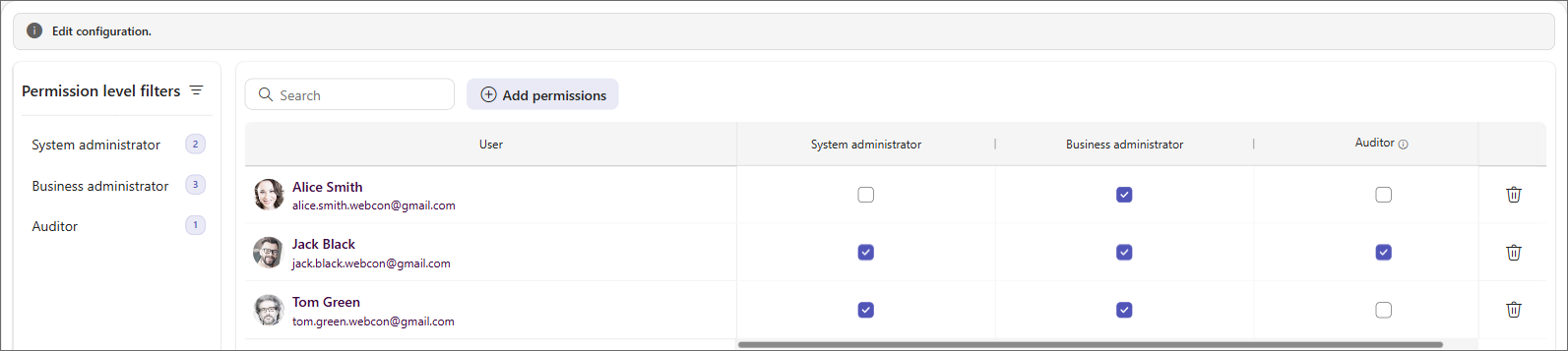
The Permission level filters panel on the left shows the number of users with each permission level and lets you narrow the list down to the selected level. The Search field filters the list of users.
To change a user's permissions, select or clear the checkbox in the column of the relevant level. The trash icon at the end of the row removes all of the user's global permissions.
Adding permissions
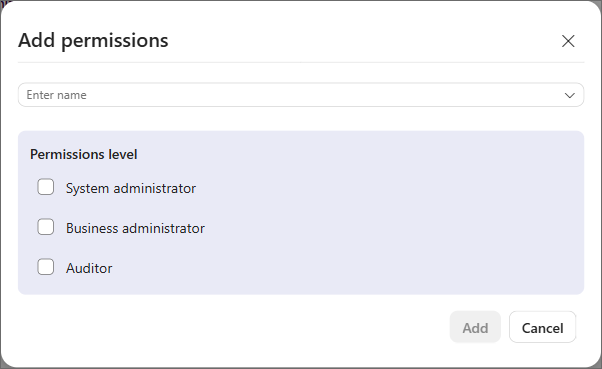
To grant global permissions to another user, click the Add permissions button, and then in the Add permissions window:
- in the Enter name field, search for and select the user,
- in the Permissions level group, select the levels to be assigned,
- click the Add button.
Global permissions give access to all applications and processes in the system. They should be assigned only to people who actually need them.
Additional information on permissions can be found in the article Uprawnienia w WEBCON Designer Studio (in Polish) available on the technical blog.