Change value of single field
This action sets (overwrites) the value of the selected form field. If a data source has been configured for the rule that builds the value, the query is executed with the connection parameters defined in that data source.
Basic configuration
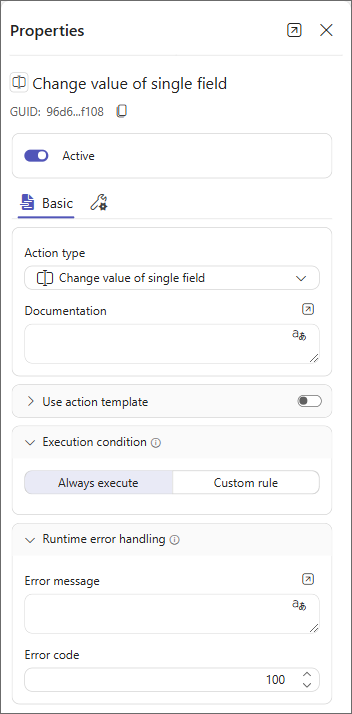
The Basic tab of the Properties panel holds settings shared by every action in an automation: the Active switch, the Action type field, the Documentation field, the Use action template switch (when enabled, the action takes its configuration from the selected action template defined in the process), the Execution condition section (decides whether the action always runs or only when a custom rule is met), and the Runtime error handling section (the message and numeric error code returned when the action fails). Since these settings are not unique to the Change value of single field action, they are described in detail in the Actions chapter.
Advanced configuration
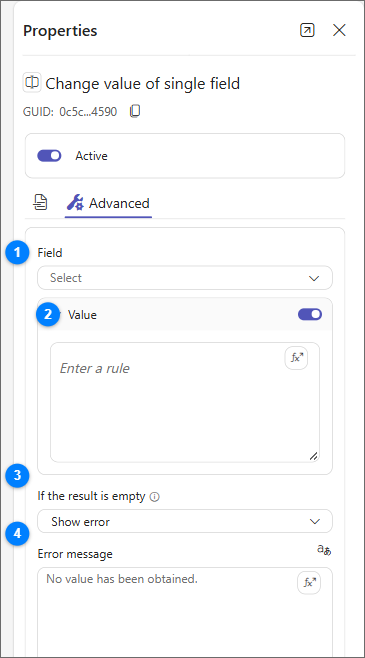
The Advanced tab holds fields specific to this action: Field, Value, If the result is empty, and Error message.
1. Field
The form field whose value will be overwritten.
When the [System] Comment form field is selected, an additional Comment author field appears, used to specify who will be recorded as the author of the comment:
- System (default),
- Current user.
2. Value
The value that will be written to the form field. The field is a collapsible section with a switch in its header, which is disabled by default. Once the switch is enabled, the value is defined using a business rule — clicking the fx icon opens the rule designer.
3. If the result is empty
This field lets you choose what happens if the business rule defined in the Value field returns EMPTY as a value:
- Show error (default) — the action returns an error, the form field value is not changed, and the user sees the message defined in the Error message field;
- Allow empty value — the EMPTY value is treated like any other value and is entered into the form field. This means the form field value is cleared and the action completes successfully without an error.
4. Error message
The message shown to the user when Show error is selected in If the result is empty and the rule in the Value field returned no result. The field is visible only when the Show error option is selected. The content can be defined per interface language using the Translations button.
For more information, see The "Change value of single field" and "Change values of multiple fields" actions on our technical blog.