Add a substitution
Substitutions in WEBCON help optimize work in business processes while an employee is absent. This action creates a substitution for an absent system user.
Basic configuration
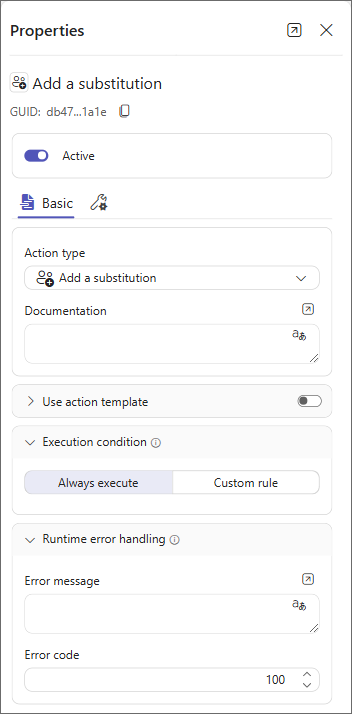
The Basic tab of the Properties panel contains settings common to every action in an automation: the Active toggle, the Action type field, the Documentation field, the Use action template toggle (when enabled, the action takes its configuration from the selected action template defined in the process), the Execution condition section (determines whether the action always runs or only when a custom rule is met), and the Runtime error handling section (the message and numeric error code returned when the action fails to execute). These settings are not unique to the Add a substitution action, so they are described in detail in the Actions chapter.
Advanced configuration
The Advanced tab contains fields specific to this action, grouped into sections: Configuration mode, Substitution type, Replaced person, Substitute, and Substitution scope.
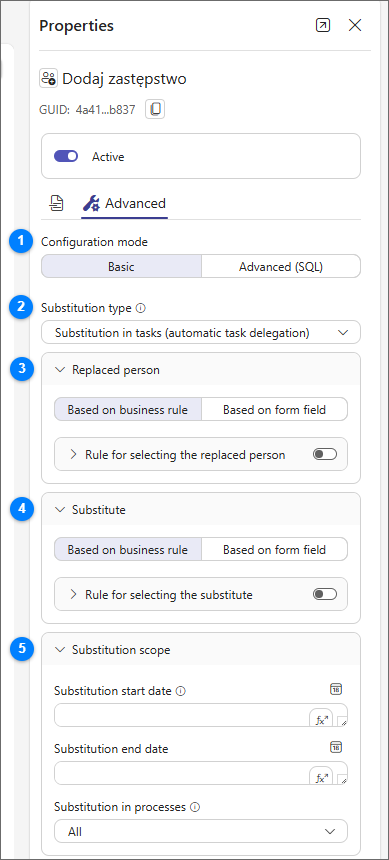
1. Configuration mode
How the action will be configured:
- Basic - the action is configured using the fields available on the Advanced tab.
- Advanced (SQL) - the action is configured based on an SQL query — the remaining fields of the tab are no longer available, and only the section described in Configuration based on an SQL query can be edited.
2. Substitution type
The behavior of the substitution once created:
- Substitution in tasks (automatic task delegation) - when a task is created for the replaced person, an additional task is created for the substitute. The substitute can perform the task on behalf of the replaced person. Settings for substitutions of this type are also available from Task creation.
- Work on behalf of another user with full access - the substitute works in the process with the same privileges as the replaced person. Among other things, they can start or modify an instance, and have access to reports and dashboards; all operations performed by the substitute are signed as if the replaced person had performed them. Settings for substitutions of this type are also available from Settings of the process.
3. Replaced person
Defines the person for whom the substitution is created:
- Based on business rule — turning on the Rule for selecting the replaced person toggle opens a business rule editor, which should return the login (with domain) or UPN of the replaced person.
- Based on form field — the person is defined using the Form field and Column fields, which indicate the form field and its column from which the login or UPN of the replaced person will be read.
4. Substitute
Defines the person who will take over the substitution. Configuration is analogous to the Replaced person section — the same modes are available: Based on business rule (the Rule for selecting the substitute toggle) and Based on form field (the Form field and Column fields).
5. Substitution scope
This section defines the time and process scope of the substitution:
-
Substitution start date and Substitution end date — define the time interval during which the substitution is active.
tipThe date can be entered manually, selected from the calendar, or built dynamically using the rule editor available under the fx icon. All dates are expressed in the database time zone. If the start date is earlier than the current date, the substitution takes effect from the moment it is created.
-
Substitution in processes — the scope of processes covered by the substitution:
- All - the substitution applies to all processes that have substitutions of the given type enabled.
- Selected - the substitution applies to the processes indicated in the additionally displayed Processes field.
- Selected based on rule - the substitution applies to the processes whose IDs are returned by the rule indicated in the Processes IDs field (available after turning on the toggle).
For processes Selected based on rule, the configuration allows you to indicate a list of applications and processes' IDs for which a substitution is to be created (a list in the form of IDs separated by a semicolon).
Application IDs must coincide with process IDs. It means that when creating a substitution for a specific process, it is required to indicate an application in which the process is defined. Providing application IDs is optional. If the application ID will not be specified, the substitute will not have access to the application (reports, dashboards, starts); however, they will be able to work within the specified process.
If the process is related to several application, provide IDs of those applications in which the process is to be available.
Configuration based on an SQL query
Selecting Advanced (SQL) in the Configuration mode field allows the action to be configured based on an SQL query. The Data source field (the database the query will be run against) and the SQL query field then become available.
The query should return data in the following format:
- Person — the person being substituted: login with domain or UPN, e.g.
webcon\f.lastorf.last@webcon.com. Required column. - Acting — the substitute: login with domain or UPN. Required column.
- DateFrom — the substitution start date. Required column.
- DateTo — the substitution end date. Required column.
- Type — the substitution type: NULL or 0 means Substitution in tasks, 1 means Work on behalf of another user. Optional column — if not defined in the source, a substitution of the Substitution in tasks type is created.
- ProcessID — the IDs of the processes (separated by a comma) the substitution applies to. Returning NULL makes the substitution apply to all processes with substitutions of the given type enabled. Optional column.
- ApplicatonID — the IDs of the applications (separated by a comma) the substitute should have access to while working on behalf of the replaced person. These identifiers are closely related to the process identifiers returned in the ProcessID column. When creating a substitution for a specific process, the ID of the application in which that process is available must also be provided. If the application ID is not provided, the substitute will be able to work within the process but will not have access to the application (reports, dashboards). For the Substitution in tasks type, the values of this column are ignored. Optional column.
- CompanyID — the ID of the company the substitution applies to (NULL for all companies). Optional column.
More information on substitutions is available in the following articles: