Out-of-office assistant
The action manages the out-of-office assistant available on an Exchange server.
Basic configuration
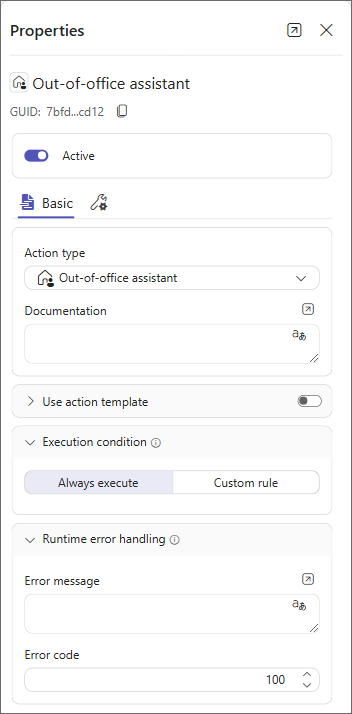
The Basic tab of the Properties panel contains settings shared by every action in an automation: the Active toggle, the Action type field, the Documentation field, the Use action template toggle (when enabled, the action takes its configuration from the selected action template defined in the process), the Execution condition section (decides whether the action always runs or only when a custom rule is met), and the Runtime error handling section (the message and numeric error code returned when the action fails to execute). Since these settings are not unique to the Out-of-office assistant action, they are described in detail in the Actions chapter.
Advanced configuration
The Advanced tab contains fields specific to this action, grouped into sections: general fields, Only send during this time range, Automatic reply, and Notification recipients.
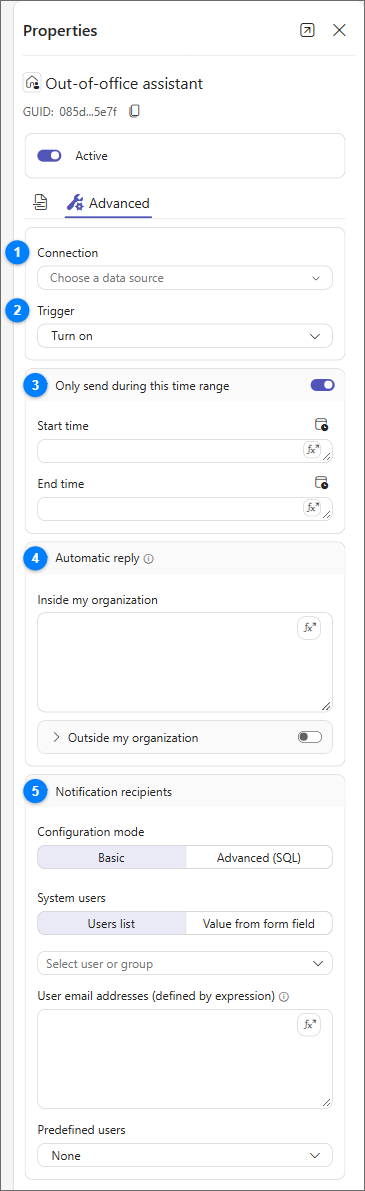
1. Connection
The Exchange Server data source the action is directed to.
2. Trigger
The action's behavior once triggered:
- Turn on - enables the out-of-office assistant and starts sending automatic replies.
- Turn off - disables the out-of-office assistant.
The option selected here affects the availability of other fields of the tab.
3. Only send during this time range
The section lets you restrict automatic replies to a specific time range. The section is enabled with the toggle in its header, which is off by default. When the toggle is on, the following fields are available:
- Start time — the beginning of the time range during which automatic replies are sent.
- End time — the end of the time range during which automatic replies are sent.
4. Automatic reply
The content of the automatic reply sent to senders:
- Inside my organization — the reply content sent to senders inside the user's organization; the field can be built dynamically using the rule editor available under the fx icon.
- Outside my organization — enabling this toggle exposes additional fields for senders outside the organization:
-
Send replies to — the scope of reply recipients: My contacts only or Anyone outside my organization.
-
Message content — the reply content sent to senders outside the organization; the field can be built dynamically using the rule editor.
-
5. Notification recipients
The section lets you specify the users the out-of-office assistant will be configured for.
Configuration mode determines how recipients are decided:
-
Basic — recipients are selected from a user list or based on a form field value. The following fields are then available:
- System users — a Users list / Value from form field toggle: either a static pick of a user or group (with an Active Directory search), or a dynamic pick based on a form field value.
- User email addresses (defined by expression) — the recipients' email addresses, built dynamically using the rule editor.
- Predefined users — an additional source of recipients. You can select the author, people assigned a task or a CC task on the workflow instance, or all assigned people.
-
Advanced (SQL) — recipients are determined by the Query (SQL or CAML) field — a query returning the recipients' logins or email addresses. The additional Data source field lets you specify which database the query is directed to; by default, the query runs against the database Designer Studio is currently running on.