Run an SQL procedure
The action executes an SQL query defined on the selected Data connection to a data source of type MSSQL or Oracle. Specifying the data source is required.
Basic configuration
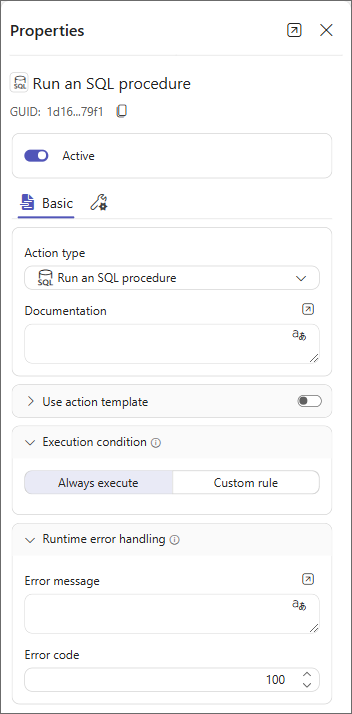
The Basic tab of the Properties panel contains settings shared by every action in an automation: the Active toggle, the Action type field, the Documentation field, the Use action template toggle (when enabled, the action takes its configuration from the selected action template defined in the process), the Execution condition section (decides whether the action always runs or only when a custom rule is met), and the Runtime error handling section (the message and numeric error code returned when the action fails to execute). Since these settings are not unique to the Run an SQL procedure action, they are described in detail in the Actions chapter.
Advanced configuration
The Advanced tab contains fields specific to this action: Data connection and SQL query.
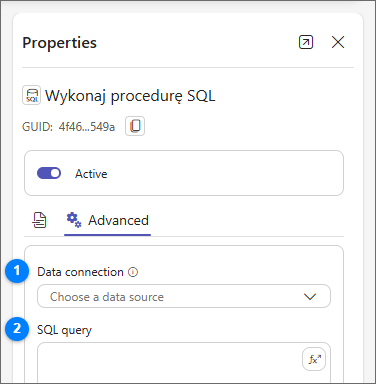
1. Data connection
The data source the query will be directed to — MSSQL or Oracle. Leaving the field empty means the query runs with the connection parameters of the workflow database. Selecting a different data source lets the query run against an external database — in that case, the query result must return columns with names matching the column names of the item list.
If referencing an external data source is not necessary, use the default data source, since changing it affects the performance of the executed queries.
2. SQL query
The content of the SQL command to execute. The query is defined using a business rule — clicking the fx icon opens a full-screen rule builder, letting you insert references to business rules and other variables available at the current Designer Studio location.