Send a standard email
The action is used to send a standard email to all people who have active tasks on the workflow instance. The message contains information about the current values of the form fields and a link to the workflow instance. The action can be embedded in an automation run on step entry, on step exit, on a transition path, or on workflow instance save.
The template of standard email messages is selected in the process settings, in the Message template field of the Configuration > Notifications > Standard e-mail settings section. The process notification settings are described in the Notifications chapter.
If the recipients, subject, or content of the message need to be configured, use the Send a custom email action.
The action is executed in "Pending in transaction" mode, i.e. its execution is postponed until the transaction is completed. The action execution modes are described in the Sequence of action execution chapter. For more information, see this article on our technical blog.
Basic configuration
The Basic tab of the Properties panel contains settings shared by every action in an automation: the Active toggle, the Action type field, the Documentation field, the Use action template toggle (when enabled, the action takes its configuration from the selected action template defined in the process), the Execution condition section (decides whether the action always runs or only when a custom rule is met), and the Runtime error handling section (the message and numeric error code returned when the action fails). Since these settings are not unique to the Send a standard email action, they are described in detail in the Actions chapter.
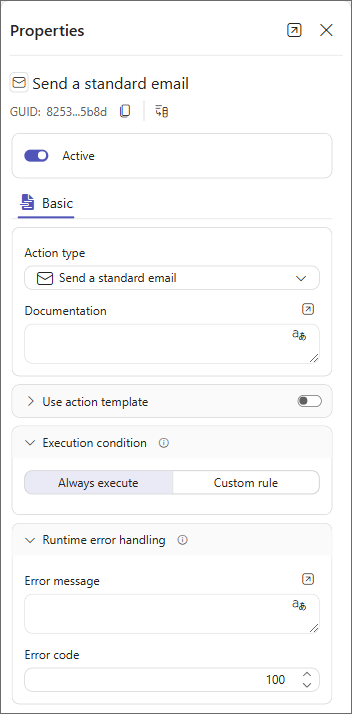
The action has no action-specific settings — the Properties panel contains only the Basic tab. The action determines the recipients and content of the message automatically.