Synchronize users list
The action queues synchronization of the WEBCON users list — full, incremental, or limited to a single selected user or group. It can be embedded on any automation event — for example, on entering or leaving a step, on a transition path, or on a menu button.
Basic configuration
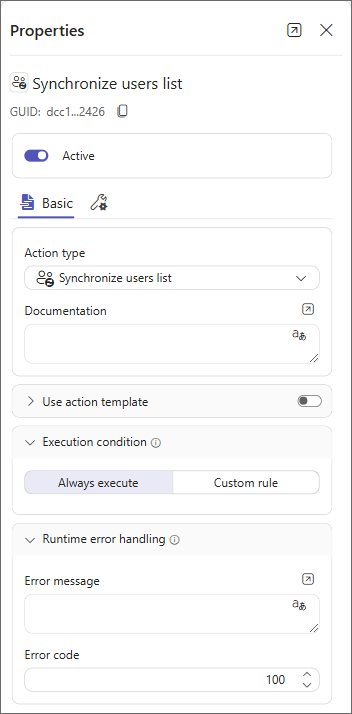
The Basic tab of the Properties panel contains the settings shared by every action in an automation: the Active toggle, the Action type field, the Documentation field, the Use action template toggle (when enabled, the action takes its configuration from the selected action template defined in the process), the Execution condition section (decides whether the action always runs or only when a custom rule is met), and the Runtime error handling section (the message and numeric error code returned when the action fails). Since these settings are not specific to the Synchronize users list action, they are described in detail in the Actions chapter.
Advanced configuration
The Advanced tab contains the Synchronization mode section with a drop-down list used to select the kind of synchronization to queue. The Queue full synchronization of all users option is selected by default. Available options:
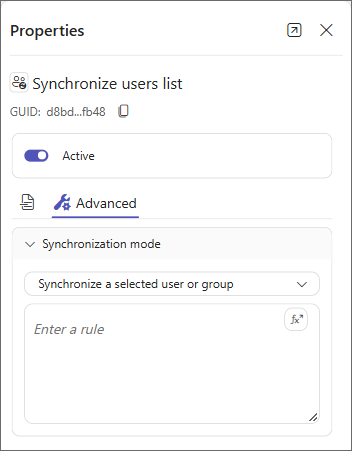
- Queue full synchronization of all users — synchronizes all WEBCON users from scratch.
- Queue incremental synchronization of all users — synchronizes only the changes made since the last synchronization (a user being added, removed, or edited).
- Synchronize a selected user or group — selecting this option reveals a field where a business rule (the fx button) is used to provide the login of the user to synchronize (e.g.
j.smith@webcon.com) or the name of a WEBCON group.
Incremental synchronization and synchronizing a selected user or group are usually much faster than a full synchronization. However, only a full synchronization guarantees that no element is skipped, for example due to configuration errors.