Remove WEBCON groups owners
The action removes the current owners of the selected WEBCON group — either the chosen users or all of them at once. It can be embedded in any automation event — e.g. on entering or leaving a step, on a path, or on a menu button.
Basic configuration
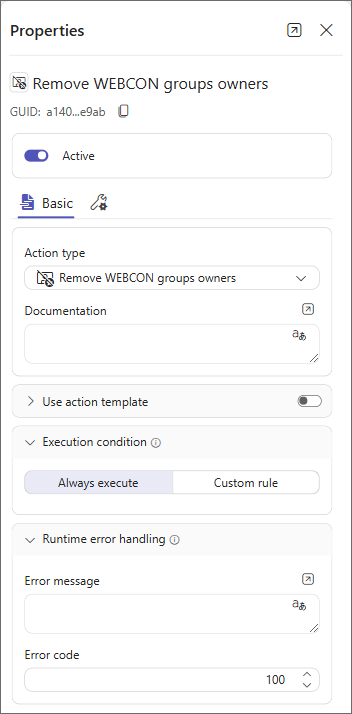
The Basic tab of the Properties panel contains settings common to every action in an automation: the Active toggle, the Action type selection field, the Documentation field, the Use action template toggle (when enabled, the action takes its configuration from the selected action template defined in the process), the Execution condition section (determines whether the action always runs or only when a custom rule is met), and the Runtime error handling section (the message and numeric error code returned when the action fails). Since these settings are not unique to the Remove WEBCON groups owners action, they are described in detail in the Actions chapter.
Advanced configuration
The Advanced tab contains fields specific to this action.
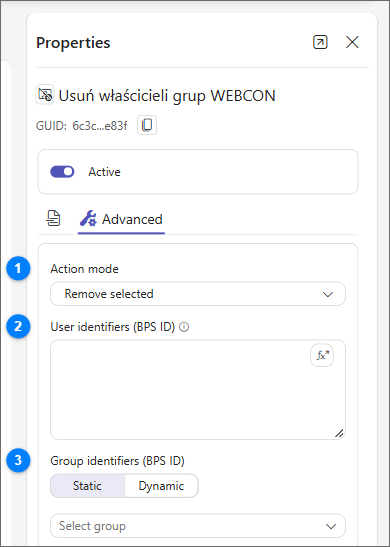
1. Action mode
The Action mode field determines which of the group's owners are affected by the removal:
- Remove selected — only the users specified in the User identifiers (BPS ID) field are removed (default option),
- Remove everyone — all current owners of the group are removed.
Selecting Remove everyone hides the User identifiers (BPS ID) field — in this mode there is no need (and no way) to specify individual users.
2. User identifiers (BPS ID)
This field is visible only in Remove selected mode. It specifies the users to be removed from the group's list of owners. The identifier can be entered in two ways:
- in UPN format (e.g.
t.green@webcon.com), - in NetBIOS format (e.g.
WEBCON\t.green) — for older environments where the BPS ID is stored in this format.
The identifier cannot contain the characters ; or #. When specifying multiple users, individual identifiers must be separated by a semicolon (e.g. t.green@webcon.com;a.smith@webcon.com). The field value can also be filled in dynamically, by pointing to it with a business rule (the fx button).
3. Group identifiers (BPS ID)
The Group identifiers (BPS ID) field specifies the WEBCON groups whose owners the action should remove. The field can be filled in two ways:
- Static — groups are selected from a searchable list of existing WEBCON groups in the Select group field.
- Dynamic — the Group selection expression field accepts group identifiers in UPN format (e.g.
management@webcon.com), provided as a static value or by a business rule (the fx button). When specifying multiple groups, individual identifiers must be separated by a semicolon (e.g.management@webcon.com;sales@webcon.com).