Remove personal data
The action locates all form fields which obtained data from a specified instance of a Personal data dictionary and then modifies their values. A Personal data dictionary can be a correctly configured process or data source.
The way in which form fields are modified depends on the cleaning method setting specified in the configuration of the Personal data dictionary (process or data source) and on the configuration of individual form fields containing personal data (the Style and behavior tab).
Basic configuration
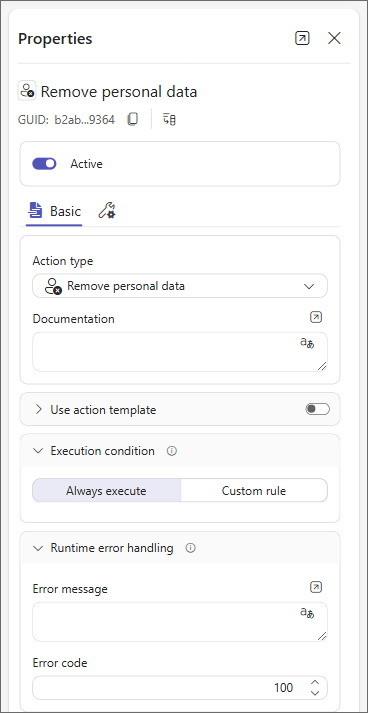
The Basic tab of the Properties panel contains settings shared by every action in an automation: the Active toggle, the Action type field, the Documentation field, the Use action template toggle (when enabled, the action takes its configuration from the selected action template defined in the process), the Execution condition section (determines whether the action always runs or only when a custom rule is met), and the Runtime error handling section (the message and numeric error code returned when the action fails). Because these settings are not unique to the Remove personal data action, they are described in detail in the Actions chapter.
Advanced configuration
The Advanced tab contains fields specific to this action, grouped into the Basic settings section.
Basic settings
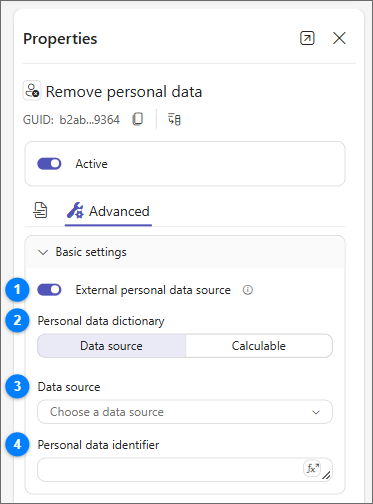
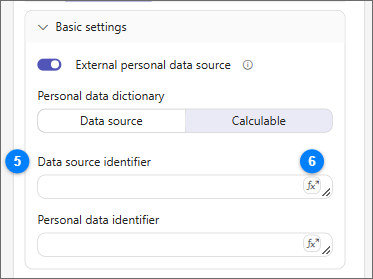
The set of visible fields depends on the toggle setting and on the option selected for the Personal data dictionary. The first screenshot shows the section with the Data source option selected, the second one – with the Calculable option selected.
-
External personal data source – a toggle that specifies where the personal data to be cleaned by the action come from. The toggle is off by default.
- When the toggle is off, the action assumes that the source of personal data is every process with the Process is a personal data dictionary option checked in its configuration. In this case, it is enough to fill in the Personal data identifier field, as instance IDs from all processes are unique throughout the whole system.
- Turn the toggle on if the personal data stored in the system have been obtained from an external data source. Turning the toggle on reveals the Personal data dictionary field.
-
Personal data dictionary – a field visible when the External personal data source toggle is on. It specifies how the data source that is the Personal data dictionary is indicated:
- Data source – the data source is selected from the list in the Data source field. This option is selected by default.
- Calculable – the data source identifier is passed dynamically in the Data source identifier field.
-
Data source – a list visible when the Data source option is selected. Only data sources that have the Data source contains personal data option enabled in their configuration are available for selection.
-
Personal data identifier – the ID of the Personal data dictionary instance (from a process or an external data source) whose data is to be cleaned. The ID can be specified dynamically with the fx button. The field is required.
ExampleIt is possible to specify multiple instance IDs from one dictionary. In such a case, the IDs should be separated by semicolons, e.g.
2345; 2234; 4377. -
Data source identifier – a field visible when the Calculable option is selected. It should contain a rule which returns the identifier of the data source that is the Personal data dictionary. The field value can be built dynamically, e.g. using variables inserted with the fx button.
-
fx – a button available in the Data source identifier and Personal data identifier fields that opens the expression editor, in which the field value can be supplemented with dynamic values.
For more information on configuring Personal data dictionaries, see the GDPR chapter and the article GDPR - Administration Process on our technical blog.