Remove attachment
The action removes attachments from a workflow instance.
Basic configuration
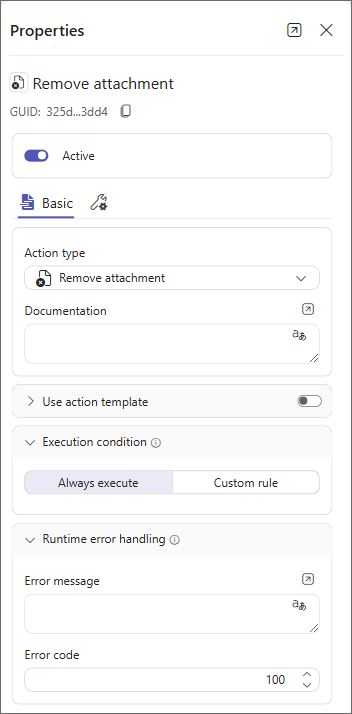
The Basic tab of the Properties panel contains settings shared by every action in an automation: the Active toggle, the Action type field, the Documentation field, the Use action template toggle (when enabled, the action takes its configuration from the selected action template defined in the process), the Execution condition section (determines whether the action always runs or only when a custom rule is met), and the Runtime error handling section (the message and numeric error code returned when the action fails). Since these settings are not unique to the Remove attachment action, they are described in detail in the Actions chapter.
Advanced configuration
The Advanced tab contains fields specific to this action, grouped into sections: Attachments to be processed and Advanced configuration.
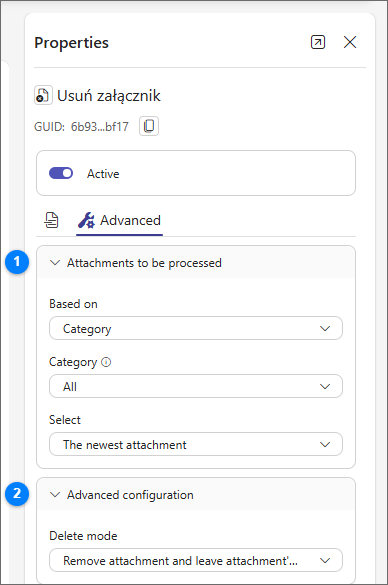
1. Attachments to be processed
The Based on field determines how the attachments to be removed are identified:
- Category - attachments are identified by their assigned category.
- Regular expression - attachments are identified by a regular expression matching the file name.
- Data source - attachments are identified by a query returning a list of identifiers.
For the Category mode, two additional fields are available:
- Category — the category of attachments taken into account:
- All - attachments belonging to any category are taken into account.
- Dynamic - once selected, the Dynamic expression field becomes available, where the category is built dynamically (using the rule editor) or entered manually, in the
ID#Nameformat or asIDalone. - None - attachments not belonging to any category are taken into account.
- Select — which of the matching attachments will be removed:
- All attachments - all attachments matching the selected category are removed.
- The oldest attachment - only the earliest added attachment is removed.
- The newest attachment - only the most recently added attachment is removed.
For the Regular expression mode, the Regular expression field is available, built manually or with the help of the variables editor.
For the Data source mode, the SQL query field is available, where you provide a query returning a list of attachment IDs from the "WFDataAttachmets" table.
2. Advanced configuration
The Delete mode field determines what happens to the data of the selected attachments in the database once the action is executed:
- Remove attachment and leave attachment's history - the attachment is removed from the workflow instance, but its historical data remains in the database.
- Remove attachment and all binary data - the attachment is removed from the workflow instance, and all of its historical data is also removed from the database.
- Remove only history of binary data - the attachment remains on the workflow instance, but its historical data is removed from the database.