Read a barcode
This action reads a barcode from attachments added to a workflow instance. In order to work properly, the action requires you to enter connection parameters with WEBCON Workflow Service.
Basic configuration
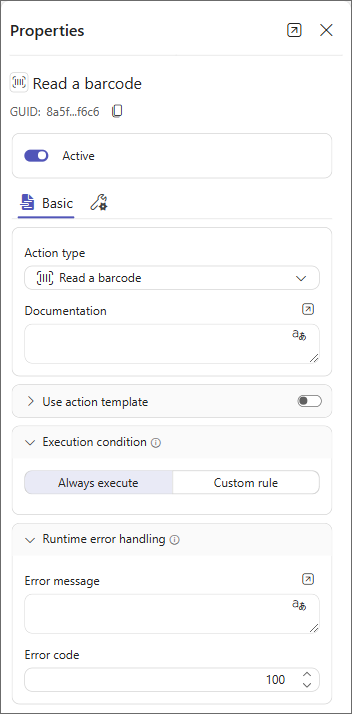
The Basic tab of the Properties panel holds settings shared by every action in an automation: the Active switch, the Action type field, the Documentation field, the Use action template switch (when enabled, the action takes its configuration from the selected action template defined in the process), the Execution condition section (decides whether the action always runs or only when a custom rule is met), and the Runtime error handling section (the message and numeric error code returned when the action fails). Since these settings are not unique to the Read a barcode action, they are described in detail in the Actions chapter.
Advanced configuration
The Advanced tab holds fields specific to this action, grouped into the Read options, Barcode types (1D), Barcode types (2D), and Barcode read sections.
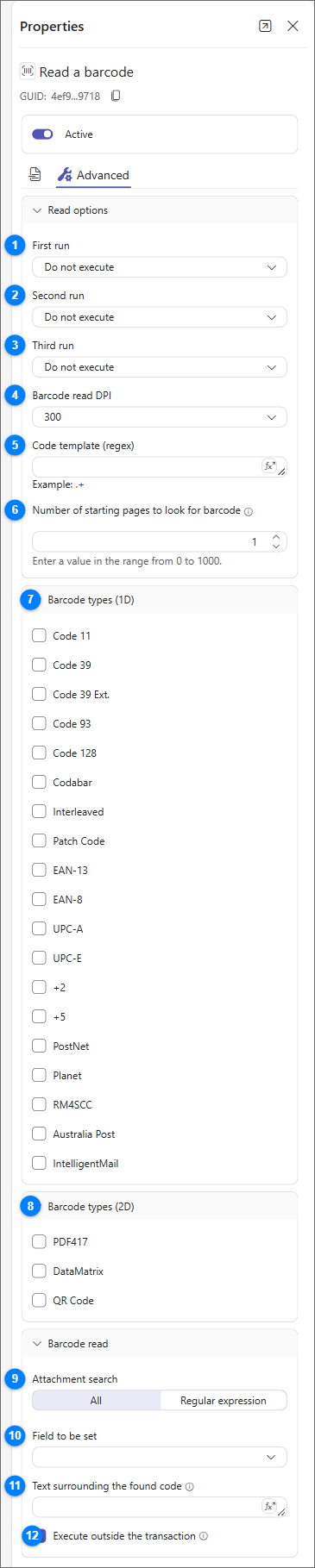
1. First run
The first digital image processing method applied when reading the barcode. All of the listed methods increase the likelihood of the barcode being recognized correctly:
| Value | Description |
|---|---|
| Do not execute | The run is skipped. |
| Standard | Reads the code without additional image processing. |
| Sharp | Sharpens the image before reading. |
| Treat as picture | Reads the attachment while treating it as a raster image. |
| Dilate | Extends the search area for the code on the image. |
| Large quiet zone size | A method dedicated to codes with wide spacing between elements. |
2. Second run
The image processing method run if the first run did not read the code. The available values are the same as in First run.
3. Third run
The image processing method run if the second run did not read the code. The available values are the same as in First run.
4. Barcode read DPI
The resolution used to analyze the image when searching for the barcode: 100, 200, or 300.
5. Code template (regex)
A regular expression that defines the text pattern the read barcode must match to be considered valid.
.+– at least one arbitrary character^((WFD_)|(0000))\d+– an expression starting with "0000" or "WFD_". This type of code is recognized by the Workflow Service.
6. Number of starting pages to look for barcode
Limits the number of leading pages of the attachment on which the barcode is searched for. Useful for multi-page files (e.g. PDF) where the code always appears at the start of the document. A value in the range from 0 to 1000.
7. Barcode types (1D)
The one-dimensional barcode symbologies considered during the search.
8. Barcode types (2D)
The two-dimensional barcode symbologies considered during the search:
9. Attachment search
Determines which attachments of the workflow instance are searched for a barcode:
- All - all attachments of the instance are searched.
- Regular expression - only attachments whose name matches the regular expression given in the Attachment name (regex) field are searched.
.+[\.].+– all attachments containing a "." character in their name.+\.pdf– all attachments ending with ".pdf"
10. Field to be set
The form field that the found barcode value will be written to.
11. Text surrounding the found code
The text that the found barcode content will be wrapped in. It must contain the {CODE} placeholder – it is replaced with the code value. If the field is left empty, the found barcode is not modified.
For the text DOMAIN\{CODE} and a barcode value of "0001", the returned value is "DOMAIN\0001".
12. Execute outside the transaction
Determines whether the action runs as part of the automation transaction or is deferred and run only after the transaction completes successfully. Running the action within the transaction is immediate, but risks aborting the transaction if the action takes too long. Running it outside the transaction postpones its physical invocation until all automations have completed without errors – in that case, automation parameters cannot be used, and an error in the action interrupts the execution of subsequent actions without starting the error-handling automation.
This field matters in particular for HotMailBoxes and HotFolders when the Read a barcode action is defined on the start step. With the checkbox cleared, the system may try to run the action on an attachment that does not yet exist in the database; with the checkbox selected, the action runs only after the attachment has been added.
An example configuration of this action is described in the article Action "Read a barcode" on our technical blog.