Move workflow (SQL)
The action moves many workflow instances to the next step at once. The instances to move and their form field values come from an indicated data source — each returned row corresponds to one moved instance.
Basic configuration
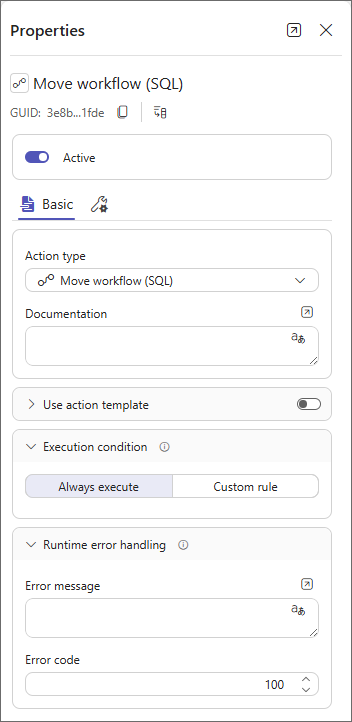
The Basic tab of the Properties panel contains settings shared by every action in an automation: the Active toggle, the Action type field, the Documentation field, the Use action template toggle (when enabled, the action takes its configuration from the selected action template defined in the process), the Execution condition section (decides whether the action always runs or only when a custom rule is met), and the Runtime error handling section (the message and numeric error code returned when the action fails to execute). Since these settings are not unique to the Move workflow (SQL) action, they are described in detail in the Actions chapter.
Advanced configuration
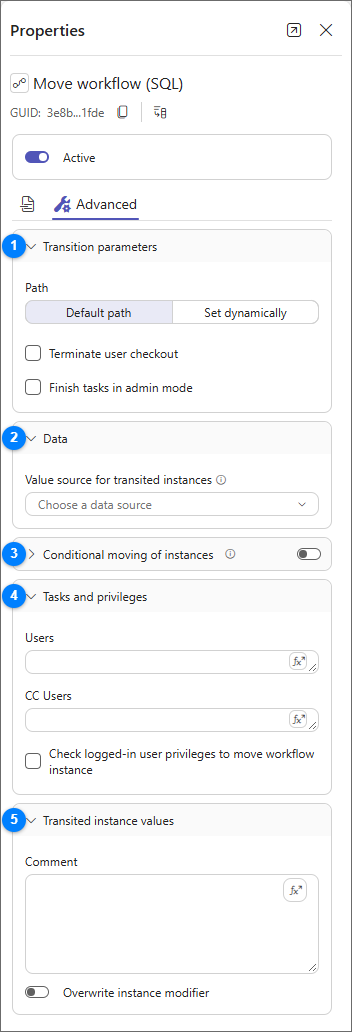
The Advanced tab contains all fields specific to the Move workflow (SQL) action, grouped into five sections: Transition parameters, Data, Conditional moving of instances, Tasks and privileges, and Transited instance values.
1. Transition parameters
The section determines the path along which the instances are moved, and how ongoing edits and open tasks are handled.
- Path — the path that all moved instances will follow. Available options:
- Default path — the default option. The instances follow the default path of the step they are in.
- Set dynamically — the Path ID field appears, where you indicate the path identifier. The value can be filled in dynamically with a business rule (the fx button).
- Terminate user checkout — applies when a moved instance is currently being edited (checked out) by another user. When checked, that user loses the ability to edit the instance and the action is executed. When unchecked, the action is not executed because the instance is being edited.
- Finish tasks in admin mode — when checked, the system forces all tasks of the instance to be finished when it is moved to the next step.
2. Data
The section allows you to indicate the data source that determines the moved instances and their form field values.
- Value source for transited instances — a data source chosen from the Connections or Data sources branch. Configure either a connection with a defined SQL query or a data source that allows the definition of a data filter. The data source should return columns whose names correspond to the form field names, and must include the
WFD_IDcolumn with the identifier of the moved instance.
The action should not affect the workflow instance that triggered it.
In addition to the columns corresponding to form field names, the data source may return the following columns:
PATH_ID— path identifier,ADM_FINISHTASKS— administrative completion of tasks,CHECK_PERM— specifies whether the current user's privileges to edit the workflow instance should be verified,OVERRIDDEN_MODIFIER— overridden modifier of the workflow instance.
Returning any of these columns overrides the corresponding parameter in the moved workflow instance.
select WFD_ID, WFD_AttText1
3. Conditional moving of instances
The section allows you to define a condition checked for each row returned by the data source of the instances being moved. The condition determines whether a given instance will be moved to the next step.
- The toggle in the section header is off by default — every instance returned by the data source from the Data section is then moved.
- When the toggle is switched on, the Data source determining instance transition field appears. Configure either a connection with a defined SQL query or a data source that allows the definition of a data filter. The data source is queried for each row returned by the data source of the moved instances. If it returns the value
1ortruein the first column of the first row, the instance is moved to the next step.

The query can include values from the data row of the moved instance. To do this, use the ##col1## tag, where col1 is the name of the data row column, e.g.:
if('##col1##'='a') select 1
4. Tasks and privileges
- Users — allows you to indicate people who will be assigned additional tasks on the moved instances, regardless of the tasks defined in the workflow. People can be indicated dynamically with a business rule (the fx button).
- CC Users — similar to the field above, allows you to indicate people who will receive an additional CC (carbon copy) task, without having to complete it.
- Check logged-in user privileges to move workflow instance — unchecked by default. When checked, the system verifies whether the logged-in user in whose context the action is executed has privileges to move the workflow instances.
5. Transited instance values
- Comment — the text of the comment added to the moved instances, e.g. with the reason for the move. The value can be filled in dynamically with a business rule (the fx button).
- Overwrite instance modifier — off by default. When the toggle is switched on, the Modifier field appears, where you can indicate the person who will be recorded as the modifier of the moved instances instead of the logged-in user.
Additional configuration information and an example of how to use the action can be found in the article Cyclical actions.