Stop performance indicator
The action is used to stop calculating performance indicators defined in the process. Performance indicators are defined in the process settings, in the Definitions > Performance indicators section. The action can be embedded on any automation event — e.g. on entering a step, on leaving it, on a transition path, or on a menu button.
It should be used in conjunction with the Start performance indicator action, which starts the indicator calculation.
The calculation of the same performance indicator can be started and stopped multiple times for one workflow instance.
Basic configuration
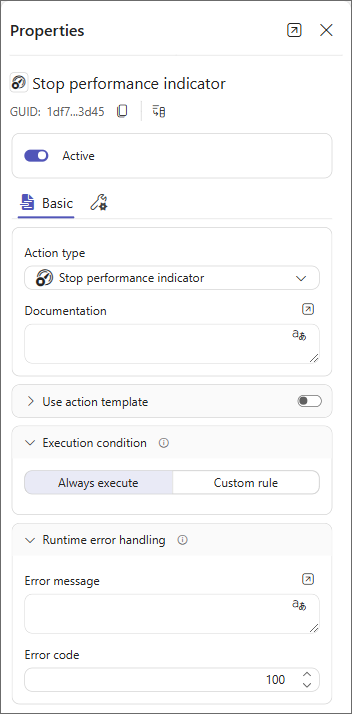
The Basic tab of the Properties panel contains settings shared by every action in an automation: the Active toggle, the Action type field, the Documentation field, the Use action template toggle (when enabled, the action takes its configuration from the selected action template defined in the process), the Execution condition section (decides whether the action always runs or only when a custom rule is met), and the Runtime error handling section (the message and numeric error code returned when the action fails). Since these settings are not unique to the Stop performance indicator action, they are described in detail in the Actions chapter.
Advanced configuration
The Advanced tab contains one field specific to this action: Indicator.

1. Indicator
The Indicator field specifies the performance indicator whose calculation the action stops. Expanding the field displays a list of the performance indicators defined in the process, together with a search box. The field has no default value and is required. The indicator can only be selected from the list — it cannot be specified dynamically.
Indicators marked as archived cannot be selected in the configuration of newly created actions. An archived indicator is also not calculated, even if actions that start and stop its calculation are configured in the process.
The way the time is calculated depends on the configuration of the selected indicator — on the setting of its Operating mode field (this is a field of the indicator configuration, not of this action):
- Count by calendar days – the time is calculated as the difference between the moment the calculation was started and the moment it was stopped; 1 day is exactly 24 hours (default option).
- Count by working days – only working days from the working days calendar are taken into account, together with the working time on a working day set for the indicator.
- Count by business rule – when the Stop performance indicator action is executed, the indicator calculation rule is evaluated, and the value it returns is treated as the final value of the indicator.
The indicator configuration is described in the Performance indicators chapter.