Advanced
The Advanced section contains QR code scanning options and personal data (GDPR) settings for an Item list column. The options work in the same way as in the Advanced section of the form field configuration.
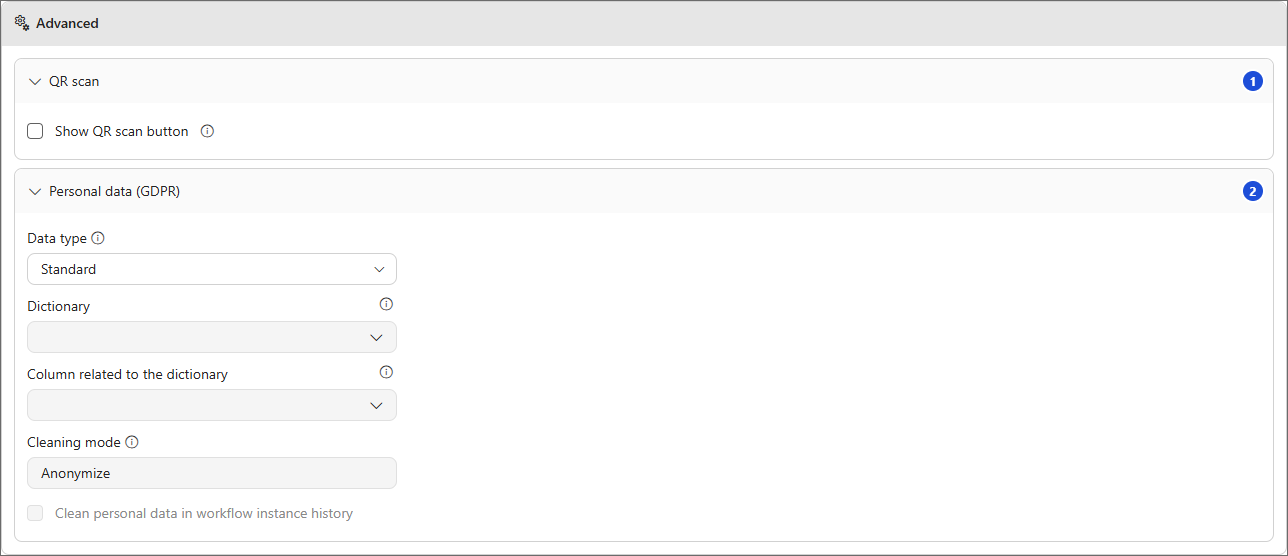
1. QR scan
- Show QR scan button – selecting this option provides a QR code scanning button in the column.
The subsection is available for Text, Floating-point number, Multiple lines of text, E-mail, Popup search window, Autocomplete, and Yes/No choice columns.
2. Personal data (GDPR)
The subsection is available for all column types and lets you specify whether the column stores personal data and how the action that removes personal data modifies its values.
- Data type – specifies whether the column stores personal data: Standard, Personal data, or Sensitive personal data.
- Dictionary – the personal data dictionary to which the dictionary instance ID refers.
- Column related to the dictionary – lets you indicate the column that stores the ID of the dictionary instance the personal data come from.
- Cleaning mode – defines how the action that removes personal data modifies the column value. The field is inactive until a Dictionary is selected.
- Clean personal data in workflow instance history – if selected, the configured cleaning mode is also applied to the historical values of the column.
For a detailed description of each option, see the Advanced section of the form field configuration.