The E-mail field allows the user to enter an e-mail address. Clicking the e-mail address on the form opens the mail client, where the pre-configured message can be sent.
Properties
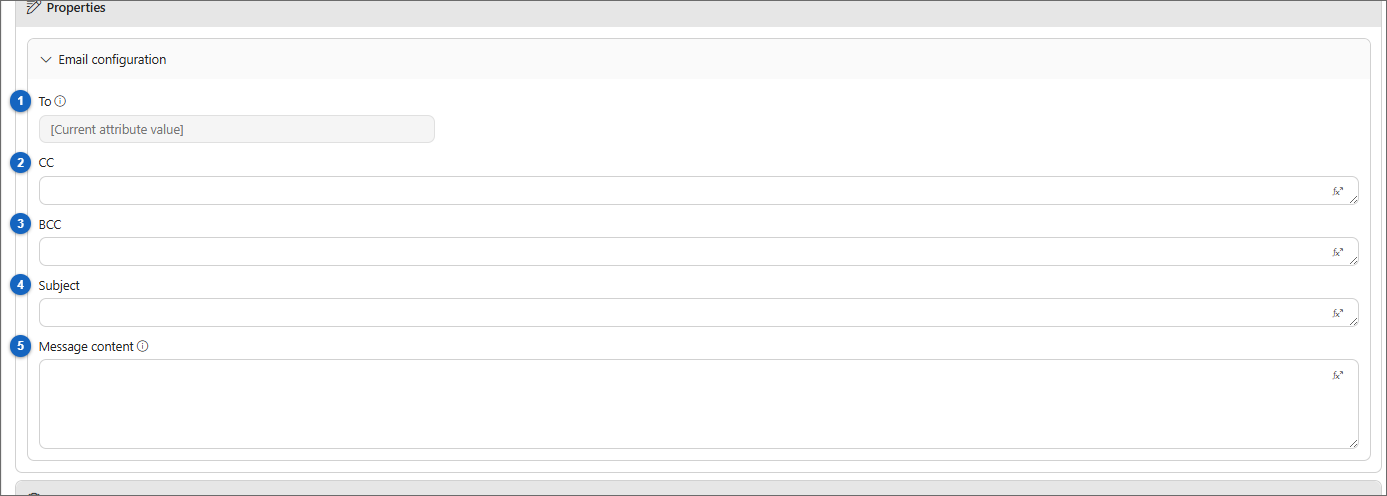
1. To
This field is not editable – the e-mail recipient's address is always the value entered in this field. Unlike the other fields in this section, the recipient address cannot be configured as a separate expression.
2. CC
The address of a person who should receive a copy of the message. The information about sending the message to an additional person is visible to the main recipient.
3. BCC
The address of a person who should receive a copy of the message. The information about sending the message to an additional person is not visible to the main recipient.
4. Subject
The subject of the e-mail message.
5. Message content
The message content cannot contain any HTML tags – they are displayed as plain, unformatted text. If the message content includes a variable referencing a Multiple lines of text field in extended mode, any HTML tags it contains will also be displayed as text.
The total number of characters in the To, CC, BCC, Subject, and Message content fields cannot exceed 2000.
Example
