Floating-point number
The Floating-point number field allows displaying and editing decimal numbers on the form.
Properties
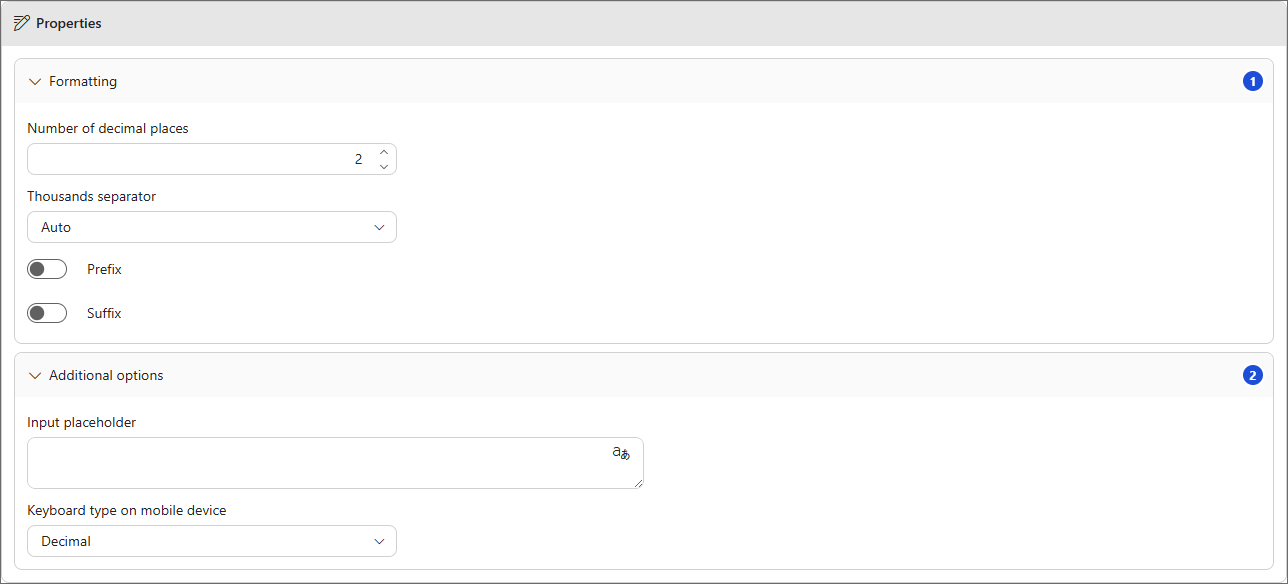
1. Formatting
- Number of decimal places – the field determines how many decimal places are displayed. You can set 0 to 6 places after the decimal point.
- Display format – the list lets you choose how the number is displayed: Auto (format matching the selected Portal language version), 1 000 000,12 (comma separates the decimal part, space groups thousands), 1,000,000.12 (period separates the decimal part, comma groups thousands), or None (the number is displayed without thousands grouping).
- Prefix – when enabled, you can enter any text that will be displayed in front of the number. You can enter a currency symbol, e.g. "$".
- Suffix – when enabled, you can enter any text that will be displayed after the number. You can enter a currency symbol, e.g. "€".
2. Additional options
- Input placeholder – lets you enter static hint text displayed on the form as placeholder text inside the field when the field's value is empty.
- Keyboard type on mobile device – the list lets you choose the input mode, which directly affects the type of on-screen keyboard displayed while editing the field's value on devices with an on-screen keyboard (including mobile devices). The type of on-screen keyboard depends on the specific device and operating system on which the form is displayed. Therefore, when changing this parameter, keep in mind that the same field may behave inconsistently across different devices. For the Floating-point number field, the default value is Decimal; the Text and Phone number options are also available.
info
For more information about formatting numbers on a form, read the ARTICLE available on the WEBCON Community website.
Example

Message displayed when trying to enter an illegal character, e.g. a letter:
