Calculated floating-point value
The Calculated floating-point value column lets you define an arithmetic expression that calculates its value – the expression can use numeric columns, other calculated columns, and numeric attributes. The column's value is saved in the database. When defining calculations based on multiple related expressions, avoid circular calculations – if no formula is entered, the column behaves the same as a regular numeric column.
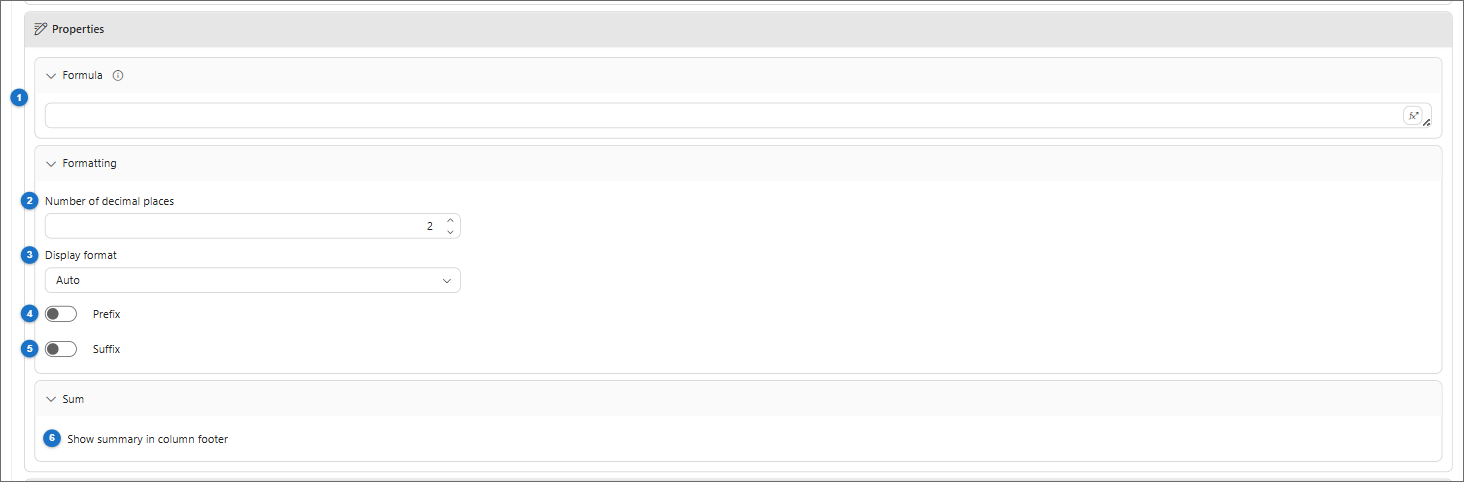
1. Formula
The field lets you enter the arithmetic expression used to calculate the column's value – it supports the +, -, /, and * operators, and parentheses ( ), interpreted according to standard math rules. Example formula: {S:DET_Value1}*100/{AttDecimal2}.
2. Number of decimal places
Lets you set the precision with which values in the column are displayed – from zero to six decimal places.
3. Display format
Lets you choose how the displayed numeric value is formatted.
| Option | Description |
|---|---|
| Auto | Format chosen automatically based on the user's language. |
| None | The value is displayed without a thousands separator. |
| 1,000,000.12 | Comma as the thousands separator, period as the decimal separator. |
| 1 000 000,12 | Space as the thousands separator, comma as the decimal separator. |
4. Prefix
Turning on the switch lets you define a prefix added before the number, e.g. a code or currency symbol.
5. Suffix
Turning on the switch lets you define a suffix added after the number, e.g. a code or currency symbol.
6. Show summary in column footer
Selecting the checkbox displays the sum of the column's values below the column.
More information about using calculated columns is available in the article Using calculated columns available on the technical blog.