Basic section
The Basic section is shown by default when opening the form field configuration, and it holds the fields common to every field type.
Fields in the Basic section
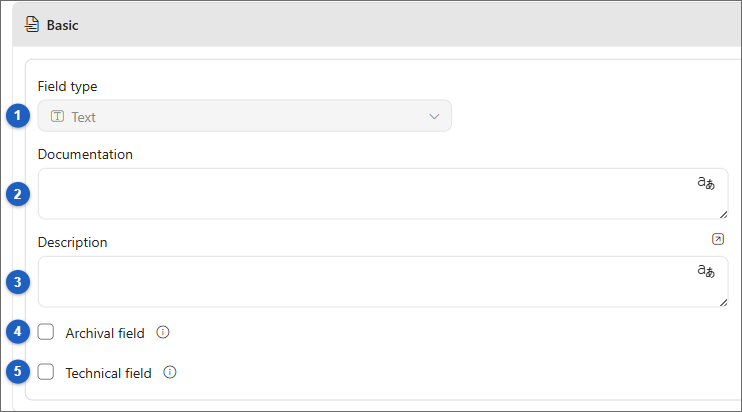
1. Field type
A non-editable field showing the type chosen when the field was created (e.g. Text); the type can no longer be changed afterwards.
2. Documentation
A description of the field's purpose and behavior on the form; its content is included in the generated process documentation.
3. Description
A short hint shown to the user next to the field on the form; the icon above the top-right corner of the field opens it in full view, which makes editing longer text easier. The maximum length of the description is 3000 characters.
4. Archival field
A form field marked as archival is only visible in WEBCON Designer Studio.
For each newly created form field, a separate column is created in the database. If a form field of a certain type is deleted, the column reserved for it in the database is released into the pool of available columns and can be used by a new form field of the same type, but the data of the deleted form field is not removed from the database.
The archival field is designed to protect the process from random data in such a case of reuse of released database columns. It is not rendered on the form (it is not available via JavaScript), is not sent with other form fields in the email notification, and is not visible in the instance history.
5. Technical field
A form field marked as technical is available via JavaScript in any mode and can be used to create Business rules and Form rules. The technical field is visible on the form and in the instance history only in Admin mode. It is not sent with other form fields in the email notification.
Text fields such as Documentation or Description have a translation button  visible in the top-right corner of the field. It lets you translate the entered text into a chosen language. If a user later selects that language in their Portal profile, the field will be displayed in the translated version.