REST Web Service connection
A REST Web Service connection defines reusable access to a REST web service: the service address, the authentication method, and the credentials. The same connection can be used by data sources, actions, and SDK add-ons — changing the connection automatically affects everything that uses it, without having to change each item individually.

The structure tree on the left lets you jump to each section: Basic, Common, DEV, TEST, PROD, Shared in applications, and Connection owners.
Basic

The Basic section contains:
- Connection type — the connection type, chosen once when the connection is first created (here REST Web Service). Once the connection exists, this field becomes read-only — its type cannot be changed afterwards.
- Description — a free-text description entered by the user, making the connection easier to recognize in the connection list.
Common
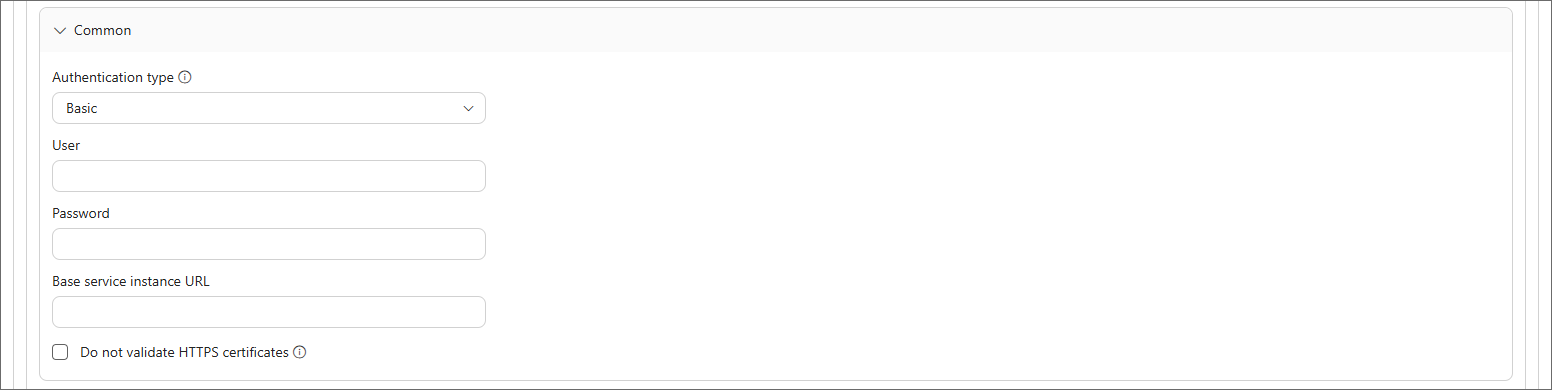
The Common section holds the default connection parameters, used by every environment unless a specific environment (DEV/TEST/PROD) has its own independent override enabled. The set of fields shown in the section depends on the value selected in Authentication type.
Authentication type
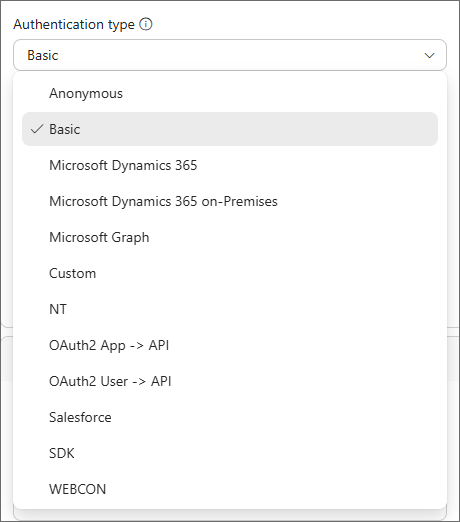
Authentication type determines how WEBCON authenticates against the REST service. Twelve values are available:
| Value | Meaning |
|---|---|
| Anonymous | No authentication — only the service address is required |
| Basic | Basic authentication with a username and password |
| Microsoft Dynamics 365 | Authentication against the cloud Microsoft Dynamics 365 service |
| Microsoft Dynamics 365 on-Premises | Authentication against an on-premises Microsoft Dynamics 365 installation — username, password, authentication service URL, client ID, and client secret |
| Microsoft Graph | Authentication against Microsoft Graph — tenant ID or authentication service URL, application ID, and application secret |
| Custom | Lets you provide any of the configuration fields. This authentication type can be used only in SDK add-ons |
| NT | Authentication with a domain account — domain username and password |
| OAuth2 App -> API | OAuth2 authentication in the application context, according to the configuration selected in Authentication |
| OAuth2 User -> API | OAuth2 authentication in the user context, according to the configuration selected in Authentication |
| Salesforce | Authentication against Salesforce — username, password, client ID, client secret, system instance URL, and authentication service URL |
| SDK | Authentication based on an SDK add-on |
| WEBCON | Connection to another WEBCON system — the connection method is selected in Connect as |
With Salesforce, the Password field must contain the user's actual password combined with the user secret.
OAuth2 User -> API can work together with an Authentication form field — such a form field triggers the user authentication flow according to the connection settings, and the access token obtained this way is then used in actions and data sources that use the same REST connection.
The set of fields displayed in the section depends on the selected authentication type:
| Authentication type | Displayed fields |
|---|---|
| Anonymous | Base service instance URL, Do not validate HTTPS certificates |
| Basic | User, Password, Base service instance URL, Do not validate HTTPS certificates |
| Microsoft Dynamics 365 | Authentication service URL, Client ID, Client Secret, Base service instance URL, Do not validate HTTPS certificates |
| Microsoft Dynamics 365 on-Premises | User, Password, Authentication service URL, Client ID, Client Secret, Base service instance URL, Do not validate HTTPS certificates |
| Microsoft Graph | Tenant ID / Authorization URL, App ID, App Secret, Base service instance URL, Do not validate HTTPS certificates |
| Custom | User, Password, Authentication service URL, Client ID, Client Secret, Base service instance URL, Do not validate HTTPS certificates |
| NT | User, Password, Base service instance URL, Do not validate HTTPS certificates |
| OAuth2 App -> API | Authentication, Base service instance URL, Do not validate HTTPS certificates |
| OAuth2 User -> API | Authentication, Base service instance URL, Do not validate HTTPS certificates |
| Salesforce | User, Password, Authentication service URL, Client ID, Client Secret, Base service instance URL, Do not validate HTTPS certificates |
| SDK | Base service instance URL, the required SDK add-on field, Do not validate HTTPS certificates |
| WEBCON | Connect as, Client ID, Client Secret, Base service instance URL, Do not validate HTTPS certificates (with User (obsolete), the User field is shown as well) |
Connection fields
- User and Password — the credentials for the REST service (with NT — the domain user and their password).
- Authentication service URL — the address of the service that issues access tokens for the web service.
- Client ID and Client Secret — the identifier of the client (application) registered with the authentication service, and its secret.
- Tenant ID / Authorization URL, App ID, App Secret — the Microsoft Graph equivalents of the fields above: the tenant ID or authentication service address, the application ID, and the application secret.
- Authentication — a list for selecting an OAuth2 authentication configuration defined in the system, used by OAuth2 App -> API and OAuth2 User -> API. The field is required for these methods.
- SDK add-on — the SDK add-on that performs authentication (SDK method only). The field is required.
- Base service instance URL — the base address of the REST service that calls made through the connection refer to. The field is required in the Common section and in every environment with an independent override enabled.
- Do not validate HTTPS certificates — skips validation of the certificate of a service exposed over HTTPS (details below).
Connect as
Connect as is shown only for the WEBCON authentication type and determines the context in which the connection to another WEBCON system is made:
| Value | Meaning |
|---|---|
| User (obsolete) | Connects in the user context to WEBCON systems in versions 2024 and older. For newer versions, use the OAuth2 User -> API authentication type |
| Application (obsolete) | Connects as an application account to WEBCON systems in versions 2024 and older |
| Application (OAuth) | Connects as an application account to WEBCON systems in versions 2022 and newer |
Do not validate HTTPS certificates
A REST service exposed over HTTPS should have a valid certificate:
- Certificate is trusted — the validity of the certificate is checked in the certificate center, and the option does not need to be selected.
- Certificate is issued locally — if the certificate was not added to the trusted certificates on the server, select Do not validate HTTPS certificates; otherwise the certificate will be considered invalid.
An invalid certificate may result in the following error message: "Could not establish trust relationship for the SSL/TLS secure channel. ---> System.Security.Authentication.AuthenticationException: The remote certificate is invalid according to the validation procedure."
Ignoring certificate validation is not recommended.
To learn more about connecting to web services through the HTTPS protocol, read the ARTICLE available in the WEBCON Developer website.
DEV / TEST / PROD
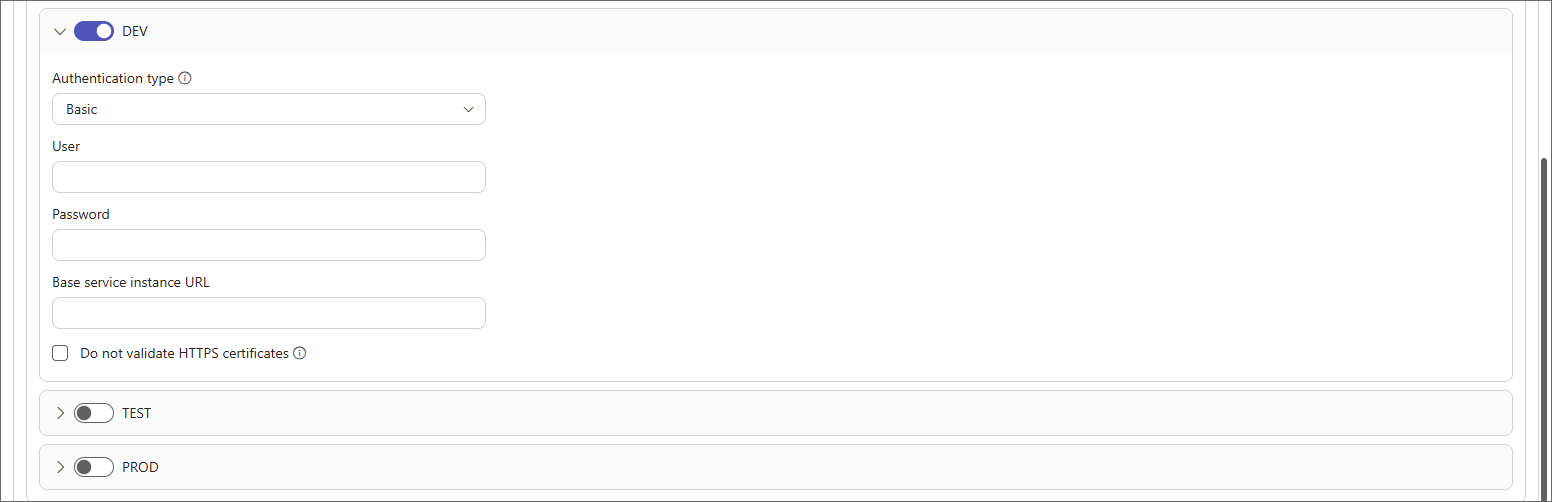
Each of the three environments (DEV, TEST, PROD) has its own switch that breaks inheritance from the Common section:
- When the switch is off — the environment inherits the connection parameters from the Common section.
- When the switch is on — the environment shows the same set of fields as the Common section (including Authentication type), which must be filled in independently of the common values. An environment can therefore use, for example, a different service address or a different authentication type.
Shared in applications
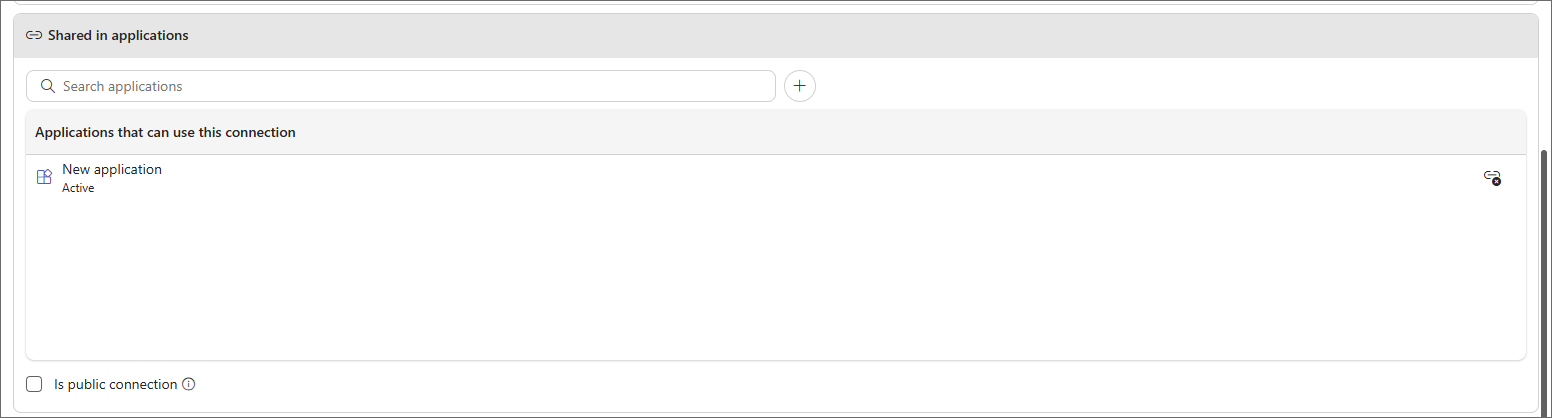
The Shared in applications section shows which applications currently use this connection. The Search applications field together with the Attach to application button lets you link the connection to another application; the Applications that can use this connection table lists the applications already linked to it (in the example above, New application), along with their status and an icon for detaching the link.
The Is public connection checkbox at the bottom of this section makes the connection available to every application in the system, so it can be used by processes running in any application — without having to link it to each one individually.
Connection owners

The Connection owners field defines which users are allowed to edit the connection configuration and share it with further applications. Other Designer Studio users who are not connection owners and do not have system administrator rights can use the connection in the applications it is shared with, but cannot edit its configuration.