Step 3: Determining approving person
This step specifies who should be assigned the task of request approval.
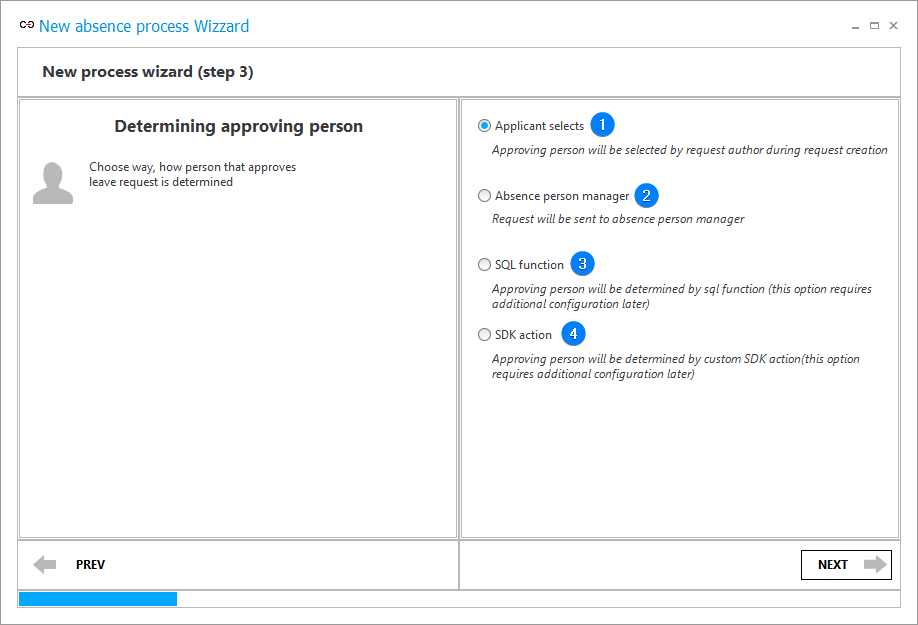
1. Applicant selects
When a request is created, the "Approving party" form field of Person or group type is added to it. The field must be completed in the registration step. The task will be created based on the form field value. The default form field value is the superior of the party submitting the request.
2. Absence person manager
The task is created automatically for the superior of the person taking the leave.
3. SQL function
The "Approving party" form field of Person or group type is added and the "Get approving party" action is inserted in the "Submit for approval" path which sets the value of this form field.
The task is created based on the form field value. The action configuration should be supplemented with an appropriate SQL query once you finish working with the annual leave process wizard.
4. SDK action
The "Approving party" form field of Person or group type is added and the "Get approving party" action is inserted in the "Submit for approval" path which sets the value of this form field.
The task is created based on the form field value. The action configuration should be supplemented with an appropriate add-in once you finish working with the annual leave process wizard.