LDAP Directory
The source allows you to retrieve data from the LDAP directory.
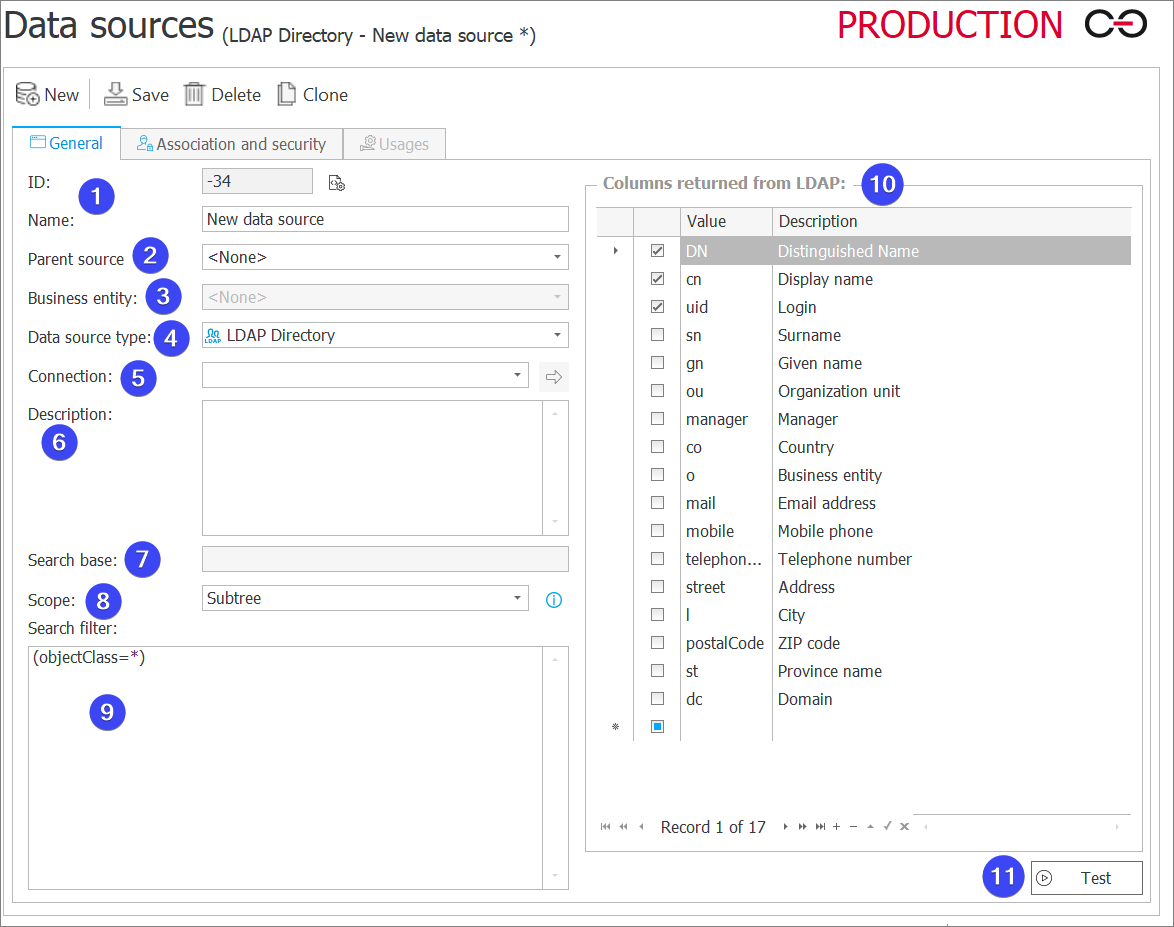
1. Basic parameters
- ID – The data source identifier (if the value is smaller than "0", the source has not been saved in the database yet).
- Name – Name of the data source entered by the user.
2. Parent source
Each data source can contain subordinate sources which are related to a company within the system. If a parent source is referenced from a workflow instance which belongs to a specific company, and that company has a subordinate source associated with it, the query will reference this subordinate source instead. If a parent source has been defined for the source, you need to enter the name of the company for which it is defined.
3. Business entity
A business entity to which the defined source belongs. If the source has a defined business entity, entering the superior source is required.
4. Data source type
The type of the current data source. The field specifies the location from which data is retrieved.
5. Connection
The drop-down list is used to define the authorization required to access the database.
6. Description
Description of the data source defined by the user.
7. Search base
It is set based on the Base DN in the selected LDAP Directory connection.
8. Scope
Specifies the scope of a search. The available options are:
-
Subtree – search the base object (specified in the Search base field) and all child objects with their child objects.
-
One level – search the child objects of the base object, but not the base object itself.
-
Object – search only the specified base object.
9. Search filter
The field allows you to display only the data complying with the query entered.
10. Columns returned from LDAP
A list of columns returned as a result of querying the LDAP directory. You can add a new column, but it is necessary to return a profile property that was not enlisted on the list of returned columns.
11. Test
The button executes a data source test. A query is executed and test results are returned. When an error occurs, a message is displayed.