LDAP Directory
The functionality allows you to establish a connection and retrieve database from the LDAP directory.
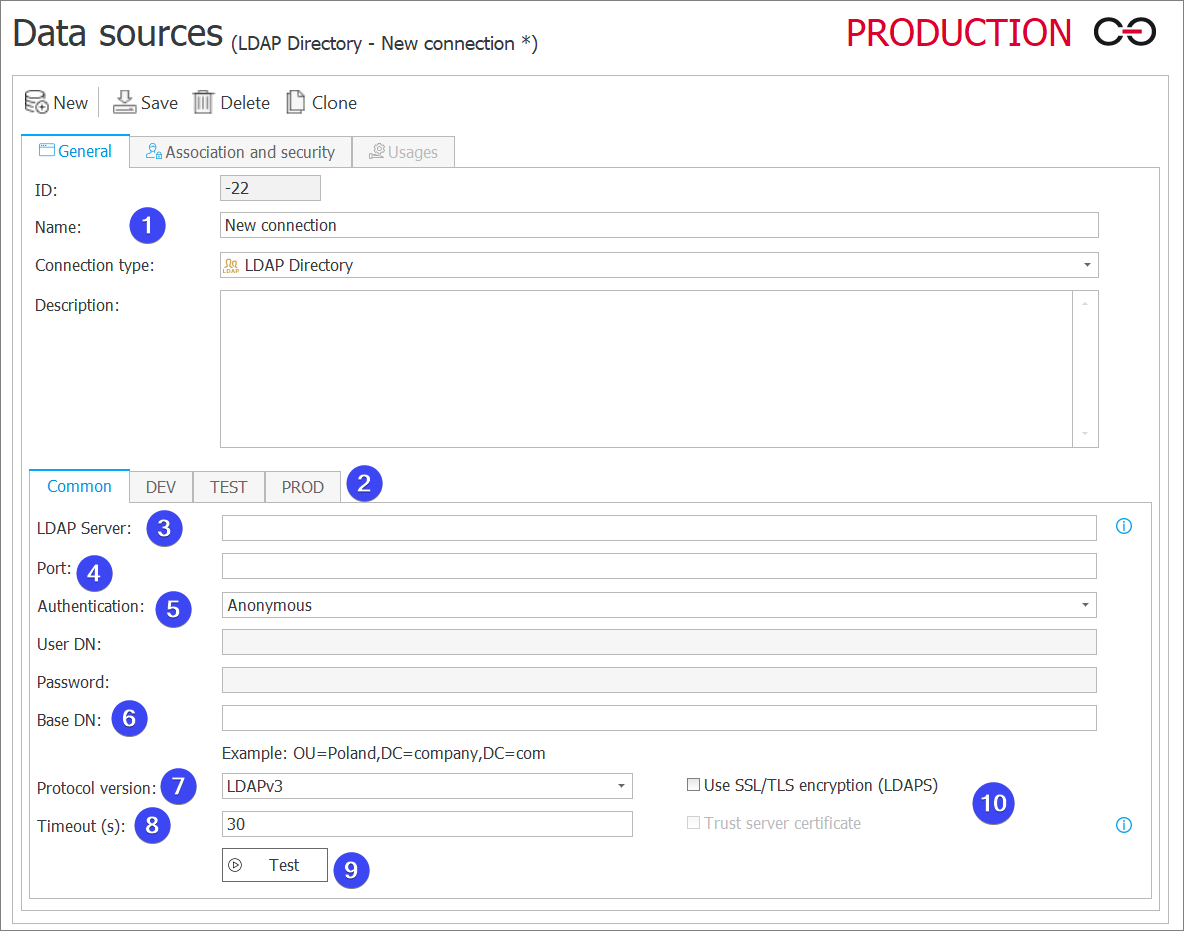
1. Basic connection parameters
- ID – the connection identifier (if the value is smaller than "0", the connection has not been saved in the database yet).
- Name – name of the connection entered by the user.
- Connection type – the field allows you to specify a connection type. The field is filled in automatically.
- Description – description of the connection entered by the user.
2. Environment
Defines the behavior of the connection in particular environments. The Common tab sets the default parameters that are to be used across all three environments (DEV/TEST/PROD). The tabs dedicated to the individual environments can be used to enter custom parameters. In such case, it is necessary to check the Break inheritance box (this will override the settings specified in the Common tab) and then enter the desired connection settings.
3. LDAP Server
The domain name or the IP address of the LDAP server.
4. Port
Port used for communication with the server defined in the LDAP Server field.
5. Authentication
The drop-down list allows you to choose the method for logging into the LDAP server. There are two options available:
- Anonymous – enables you to connect with server anonymously,
- Basic – defines the data of the user who establishes a connection with the LDAP server. Once you select this option, the fields for User DN and Password become active. In these fields, you need to provide the username in the proper format (e.g., CN=Joe Shmoe,OU=Webcon crew,DC=webcon,DC=pl) and the corresponding password.
6. Base DN
The field enables defining the initial point in the directory hierarchy from which all the searching operations begin (e. g. OU=Poland, DC=company, DC=com).
7. Protocol version
The drop-down list allows you to select one out of two available protocol versions: LDAPv2 and LDAPv3.
8. Timeout (s)
The field defines the maximum time available (in seconds) for connecting with the LDAP server when the SSL/TLS encryption is used.
9. Test
Testing the connection to the LDAP server.
10. Use SSL/TLS encryption (LDAPS)
Selecting the checkbox results in establishing connection that is encrypted by the SSL/TLS (LDAPS) layer and activating the checkbox Trust server certificate. If checked, communication between LDAP server and WEBCON will be encrypted without certificate validation.