Templates
The data source is created in the course of generating a new Document templates process. It returns active instances (the checkbox Active is selected on the instance form) from the processes of the mentioned type.
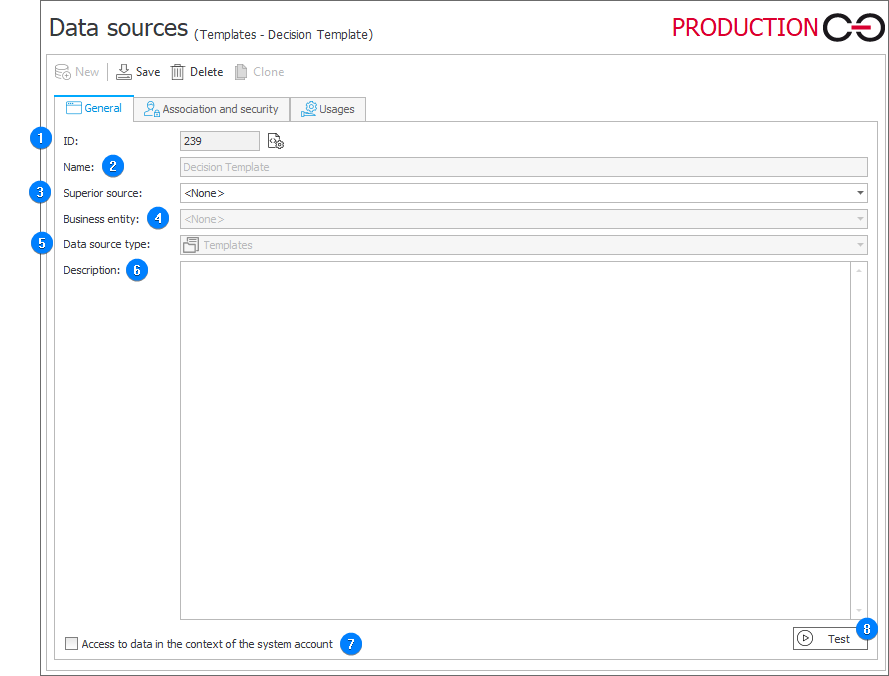
1. ID
The data source identifier (if the value is smaller than "0", the source has not been saved in the database yet).
2. Name
Name of the data source entered by the user.
3. Superior source
Each data source can contain subordinate sources which are related to a company within the system. If a superior source is referenced from a workflow instance which belongs to a specific company, and that company has a subordinate source associated with it, the query will reference this subordinate source instead. If a superior source has been defined for the source, you need to enter the name of the company for which it is defined.
4. Business entity
A business entity to which the defined source belongs. If the source has a defined business entity, entering the superior source is required.
5. Data source type
The type of the current data source. The field specifies the location from which data is retrieved.
6. Description
Description of the data source defined by the user.
7. Access to data in the context of system account
Selecting the checkbox results in displaying all data contained in the data source. When unselected, the current user sees only the data to which they are authorized.
8. Test
The button executes a data source test. A query is executed and test results are returned. When an error occurs, a message is displayed.