Update attachment
The action is used to modify the metadata (name, description and category) of attachments.
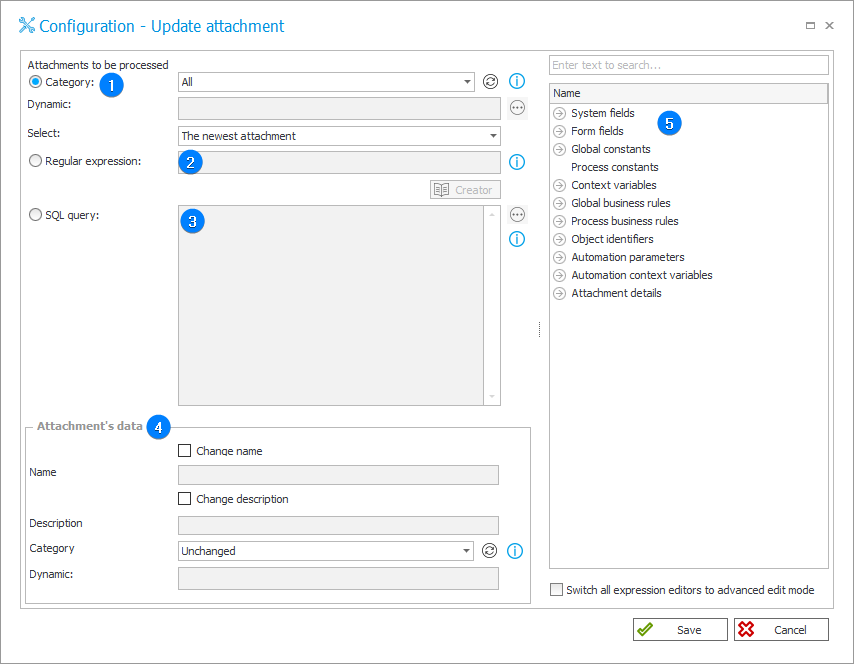
1. Category
Attachments to be processed will be selected based on their category.
Define it by selecting one of the following options:
- All – attachments belonging to all categories will be selected,
- Dynamic – create the category dynamically (using Variables editor) or enter it manually. The category can be provided in WEBCON format (i.e. ID#Name) or as ID.
- No category – attachments not belonging to any category will be selected.
Additionally, specify which attachments from the chosen category should be selected: All attachments, only The oldest attachment or only The newest attachment.
2. Regular expression
Attachments to be processed will be selected based on a regular expression.
Use the Regex Creator as an aid in constructing the expression.
3. SQL query
Attachments to be processed will be selected based on an SQL query.
This query should return a list of attachment IDs from the "WFDataAttachments" table.
4. Attachment’s data
When the action is triggered, the following attachment metadata can be changed:
- Name – after checking the Change name box, it is possible to enter a new name for the attachment (the Variables editor can be used for this purpose).
- Description – after checking the Change description box, it is possible to enter a new description for the attachment (the Variables editor can be used for this purpose).
- Category – mode of updating categories through this action:
- Unchanged – no changes,
- Dynamic – selecting this option makes it possible to enter a new category for the attachment in the Dynamic field (the Variables editor can be used for this purpose),
- Empty – after the action is executed, the attachment will not belong to any category.
5. Variables editor
Dynamically generated tree containing all variables that may be used in the current location of Designer Studio. Information on how to use variables in WEBCON, as well as a list of variables can be found here.