Remove BPS group owners
The action allows users to remove the current owners of BPS groups.
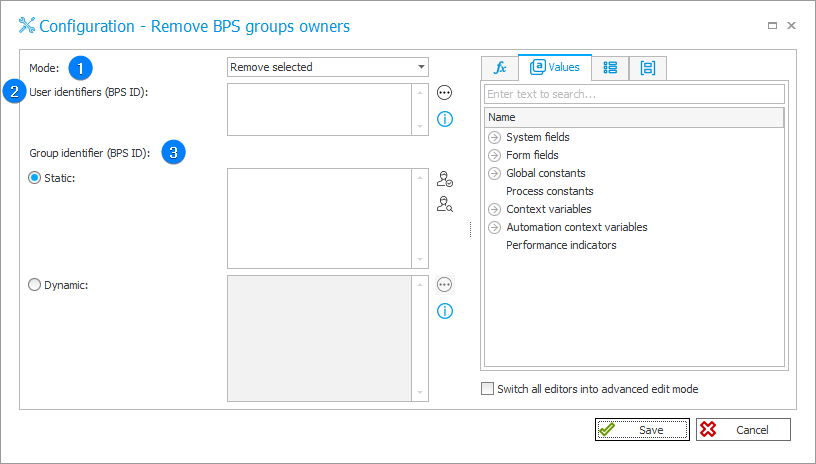
1. Mode
The dropdown list allows users to select the action mode of operation. The following options are available:
- Remove selected – allows removing the users specified in the User identifiers (BPS ID) field;
- Remove everyone – removes all current BPS group owners..
2. User identifiers (BPS ID)
The field becomes active when the Remove selected option is chosen in the Mode field.
The identifiers can be entered in two ways:
- identifier in UPN format, e.g., t.green@webcon.com;
- identifier in NetBIOS format, e.g., WEBCON\t.green, for old environments where the BPS ID is stored in this format.
The user identifier cannot contain the characters ";" and "#". When specifying multiple users, individual identifiers must be separated by a semicolon, e.g., t.green@webcon.com;a.smith@webcon.com.
3. Group identifier (BPS ID)
The section contains two options that allow users to define the group identifier:
- Static – allows users to search only for BPS groups;
- Dynamic – allows users to enter an identifier in UPN format.
The group identifier must be entered in UPN format, e.g., management@webcon.com.
The group identifier cannot contain the characters ";" and "#". When specifying multiple groups, individual identifiers must be separated by a semicolon, e.g., management@webcon.com;sale@webcon.com.