AI configuration
The AI configuration node is a child of the Global parameters node in System settings. It defines global AI settings: the AI engine, the availability of AI features, and the AI model for each feature.
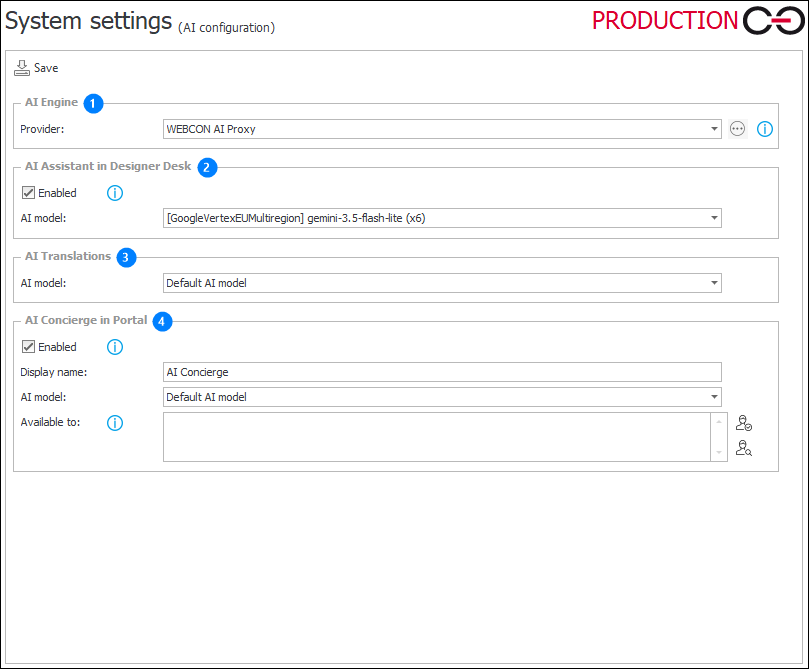
1. AI Engine
The Provider field specifies whether, and with which AI engine, features based on an AI model work. Three options are available:
| Option | Description |
|---|---|
| WEBCON AI Proxy | Enables all AI-based features in the system using the AI Token license and the AI engine hosted within the WEBCON infrastructure. Tokens give access to all features based on an AI model, such as rules, actions, and assistants. All data storage and processing take place within the EEA, and the data is not used for training WEBCON's third-party AI models. |
| Self-hosted AI | Enables the use of AI through the user's own infrastructure. It requires installing and configuring the WEBCON AI Proxy application and having the AI Proxy Self-hosted license in the license package. |
| AI blocked in the entire system | Any attempt to use an AI-based feature results in a license error, even if the license package contains the AI Token or AI Proxy Self-hosted license. |
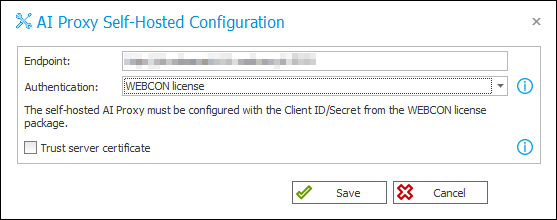
When Self-hosted AI is selected, the ... button next to the Provider field opens the AI Proxy Self-Hosted Configuration window. Currently, self-hosted AI Proxy can use models from the Google Vertex, Azure Foundry, and OpenAI providers.
AI Proxy Self-Hosted Configuration
The window contains the fields for configuring the connection to the locally hosted WEBCON AI Proxy application. The Save and Cancel buttons confirm or discard the changes.
| Field | Description |
|---|---|
| Endpoint | The network address of the WEBCON AI Proxy application. |
| Authentication | The way the WEBCON system authenticates in AI Proxy. The available methods are described in the table below. |
| Trust server certificate | When selected, the connection to the endpoint is established without verifying the server certificate, e.g. when the server uses a self-signed certificate. The field is available for the WEBCON license and Basic Auth methods. |
| Authentication method | Description |
|---|---|
| Client certificate (mTLS) | The client identity is confirmed with a client certificate in the .pem or .pfx format. The Certificate field is read-only and displays the thumbprint and the common name (CN) of the certificate. The button with the folder icon loads the certificate from a file. The Password field holds the certificate password. |
| WEBCON license | Basic Auth authentication based on the Client ID and Client Secret of the WEBCON license in use. The self-hosted AI Proxy must be configured with the Client ID and Client Secret from the WEBCON license package. |
| Basic Auth | Basic Auth authentication based on the values entered in the Client ID and Client Secret fields. |


2. AI Assistant in Designer Desk
- Enabled – specifies whether the AI Assistant is available in the Designer Desk. Disabling this option hides and deactivates the AI Process Builder when building prototypes in the Designer Desk.
- AI model – the AI model used by the AI Assistant in the Designer Desk.
3. AI Translations
- AI model – the AI model used to translate processes and applications.
4. AI Concierge in Portal
- Enabled – specifies whether the AI Concierge is available in the Portal. Disabling this option hides the AI Concierge and makes it unavailable in the Portal.
- Display name – the name under which the AI Concierge is displayed in the Portal. The name can be changed only when Legacy Designer Studio is connected to the default content database.
- AI model – the AI model used by the AI Concierge.
- Available to – users and groups who can use the AI Concierge in the Portal. If nobody is specified, the AI Concierge is available to all users.
The default AI engine is WEBCON AI Proxy. The AI Assistant in Designer Desk and the AI Concierge in Portal are enabled by default.
AI model selection list
The Default AI model option means the default model of the given feature. The list of available models is retrieved from AI Proxy and limited to the models supported by the feature. The AI model for AI Agents is selected in the configuration of each agent.
The AI model selection list displays models in the following format:
[Provider] Model name (AI Tokens cost factor) (Model expiration date - if applicable)
AI Tokens cost factor is expressed as a number indicating the relative cost of using the model compared to the base model. The base model is marked with a factor of 1, while other models may have a factor greater or less than 1, indicating that their usage is respectively more expensive or cheaper compared to the base model.