Global e-mail template
The node allows you to configure the subject and body of the messages sent by WEBCON BPS.
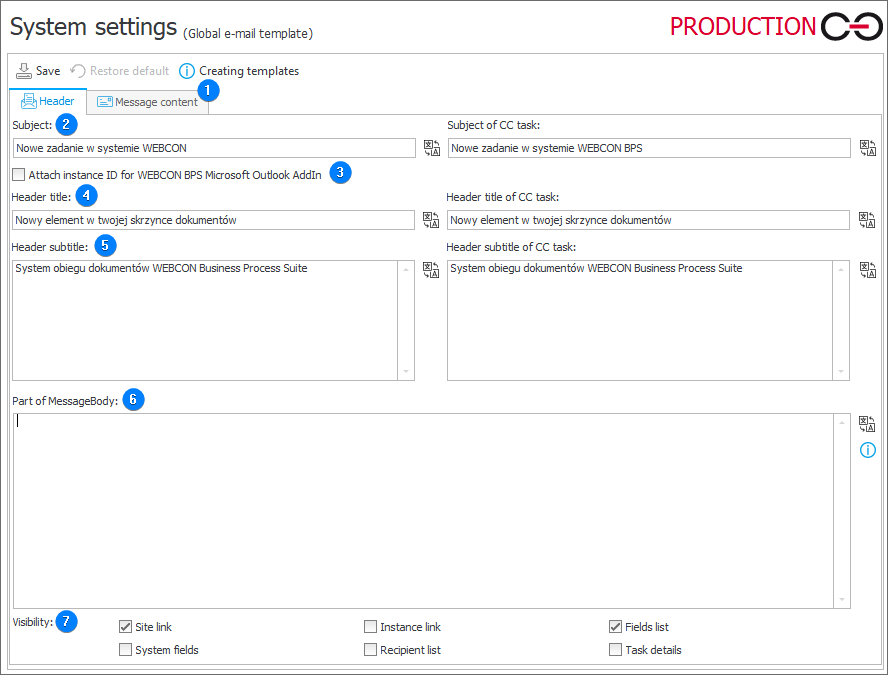
1. Message content
The tab allows you to edit the message content, also using variables editor. It contains two tabs: Editor, where you can edit the message content, and Preview, which presents the final message form.
2. Subject
The user-defined subject of the message.
- Subject of CC task – the subject of the message sent as carbon copy to a person indirectly involved in the task.
3. Attach instance ID for WEBCON BPS Microsoft Outlook Addin
Selecting the checkbox results in adding the phrase [{DBCODE}#{WFD_ID}] at the beginning of the e-mail message subject.
4. Header title
The title of the message header. It replaces the [|HeaderMain|] value in the template.
- Header title of CC task – header title of the message sent as carbon copy to a person indirectly involved in the task.
5. Header subtitle
The text placed below the message header. It replaces the [|HeaderSub|] value in the template.
- Header subtitle of CC task – text placed below the header of the message sent to a person indirectly involved in the task.
6. Part of MessageBody
The text contained in the field will replace the |MessageBody| marker in the e-mail that uses the template. The text should be formatted in accordance with the HTML standard.
6. Visibility
Site link – a field specifying whether the [|WebAdress|] value will be replaced on the message template with a link to the WEBCON Business Process Suite site.
If a standard e-mail message template is used, the link to the website should not be displayed simultaneously with the link to the instance.
System fields – a field determining whether the [|The SystemFields|] value will be replaced on the message template with a list of system fields (signature, author, creation date).
If a standard e-mail template is used, system fields should not be displayed simultaneously with the list of fields.
Instance link – a field specifying whether the [|ElementAdress|] value will be replaced on the message template with a link to the instance for which the message is sent. If a standard e-mail message template is used, the field list should not be displayed simultaneously with system fields.
Recipient list – a field specifying whether the [|Recipients|] value will be replaced on the message template with a list of the original recipients.
Fields list – a field determining whether the [|Attributes|] value will be replaced on the message template with a list of fields of a given instance. If a standard e-mail template is used, the list of fields should not be displayed simultaneously with system fields.
Task details – makes the value [|TaskDetails|], i.e. the content defined in the Task creation tab of the path belonging to the selected step.
For more information on e-mail notifications visit the following WEBCON Community websites: