Add a new list element
The action is used to add elements to SharePoint lists. It is executed in two modes: Static and Dynamic.
It is possible to add one element or copy the contents of a Data source directly to the SharePoint list using an SQL query.
Dynamic mode allows you to to add multiple elements to the list in one action execution.
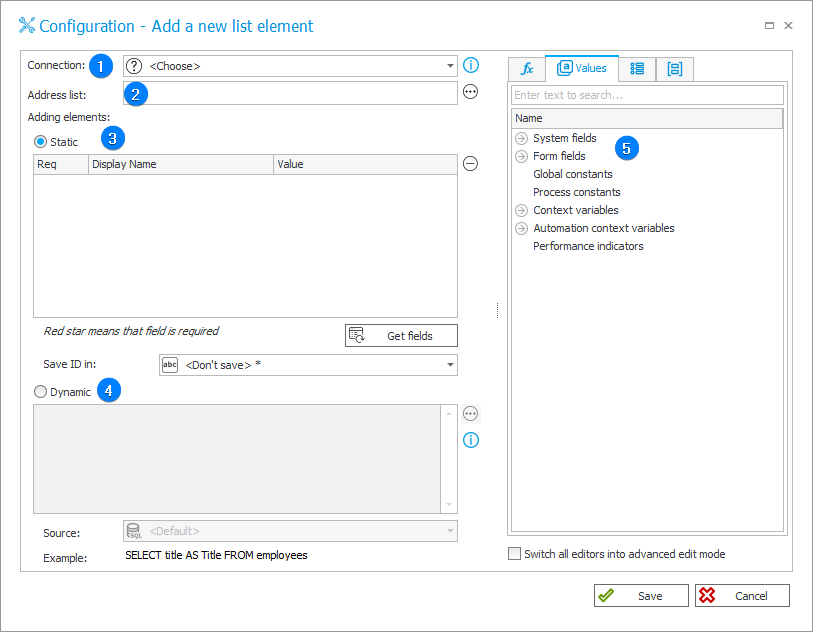
1. Connection
Specify the SharePoint site collection on which the desired list is found.
The Default option is only available for actions created in earlier versions of the system. For newly created actions, this option is unavailable.
2. Address list
After defining a Connection, specify the URL of the SharePoint list to which you want to add element(s). The URL can be entered manually or found using Select. The button opens the address selection window that can be used to indicate any SharePoint list located on the site.
3. Static
The grid allows you to add selected fields to a SharePoint list. After clicking Get fields, all available fields on a SharePoint list will be sent to the grid. You will also see whether it is a required field (in which case the element is displayed in red). The Add/Delete button makes it easy to control which fields are about to be added to a list – unwanted ones can be simply deleted. State displayed in the grid editor will exactly match the new element added to a list.
4. Dynamic
Use an SQL query to copy the contents of Data source directly to a SharePoint list. The query should return columns named
the same as the columns of the list.
If the query returns multiple rows, all of them will be added to the SharePoint list.
5. Variables editor
Dynamically generated tree containing all variables that may be used in the current location of Designer Studio. Information on how to use variables in WEBCON BPS, as well as a list of variables can be found here.
For more information on SharePoint content actions, read THIS ARTICLE on our technical blog.