Custom control (External)
The form field allows you to embed an external application on the Modern form. By using the JS API in the control you can manage the behavior of the whole form. The JS API script together with its documentation can be downloaded here. To ensure correct operation, the application run by the control must use communication protocol corresponding to the protocol of the form where it is embedded (https by default). The form field is available only for the processes run on the Modern form.
User control configuration depends on the code of the plugin – it is defined entirely by the plugin creator.
The control communicates with the form via postMessage, which requires the message to match the address (origin) of the form's window. For the control to work both in Portal and under an alternative application address, it must:
- use the
webcon.min.1.1.0.jsscript or newer, - not define the
__WEBCON_PORTAL_ADDRESS__variable in it – the control resolves the Portal address on its own.
Controls configured earlier with the __WEBCON_PORTAL_ADDRESS__ variable will only work under the address specified in that variable. After the application is published under an alternative address, the control's script must be updated.
The basic configuration is presented in the General form field configuration.
Advanced configuration
To access additional configuration options, click the Advanced configuration button available in the bottom, right corner of the form field configuration window.
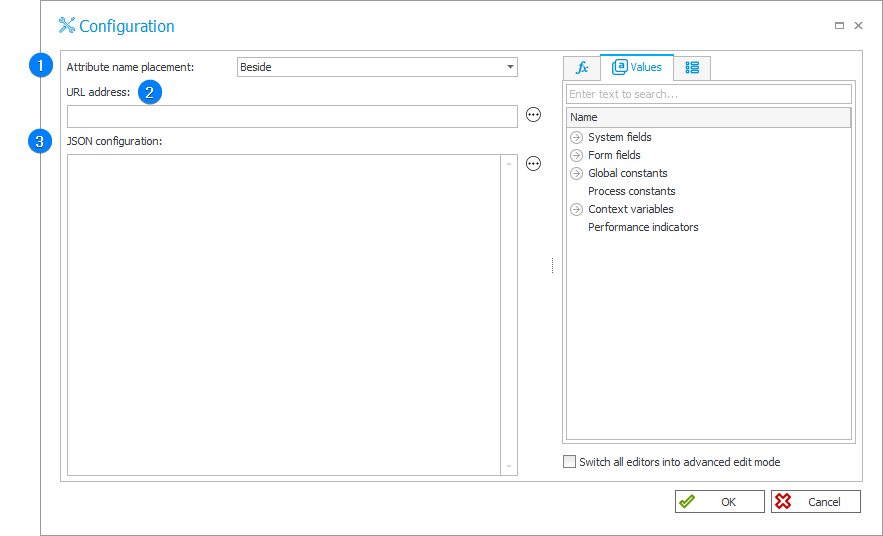
Attribute name placement – decides where the form field name is displayed. Available options:
- Do not show,
- Beside,
- Above.
URL address – the field allows you to enter an URL address.
JSON configuration – the field allows you to configure a control in the JSON format.