Menu button
The menu button is a button displayed in the top form bar in WEBCON BPS Portal. The button can be used to trigger automations defined by users.
To make the form more readable it is possible to group automations triggered by the menu button by:
- setting up several automations under one button. The automations are then executed top-down in a transaction,
- defining a group of buttons. Its name is displayed on the form, while the buttons configured under it are available from a drop-down menu.
Menu buttons
If a number of automations is defined under one button, they are executed in accordance with the following logic:
- automations are triggered top-down in a transaction,
- if a condition for executing an automation returns the value of "0", it is skipped. The remaining automations are unaffected,
- if there are several automations that redirect (e.g. a Hyperlink action) or show result, only the last one is executed,
- if an automation containing the Hyperlink action is defined under the button, the Automatic save option is unavailable,
- automations that require user interaction cannot be defined under one button with other actions, i.e. the Change form type action must be defined under a separate button,
- for a menu button to be visible in the View mode (i.e. when viewing the form without having the instance checked out), the following actions must be defined as the only ones under their specific button:
– Hyperlink (the Automatic save checkbox must be selected),
– Generate/Update a Word file (the Save as an attachment checkbox must be unchecked),
– Generate a PDF file (the Add as attachment checkbox must be unchecked),
– Printout a barcode label,
– Generate an HTML printout.
All the actions must be associated with the Menu button.
Button groups
You can create a button group for automations added both globally and on individual steps.
To create a group, in the Actions tab, right-click the selected item from the Actions list and choose Add group from the context menu.
The configuration of a button group is similar to the configuration of a single button. The group name is displayed on the form and all the buttons from the group are displayed in a drop-down menu after clicking the respective group button.
To learn more about grouping menu buttons, read the ARTICLE available on the WEBCON Community website.
Configuration
Button settings
The tab provides options to configure the operation of the button.
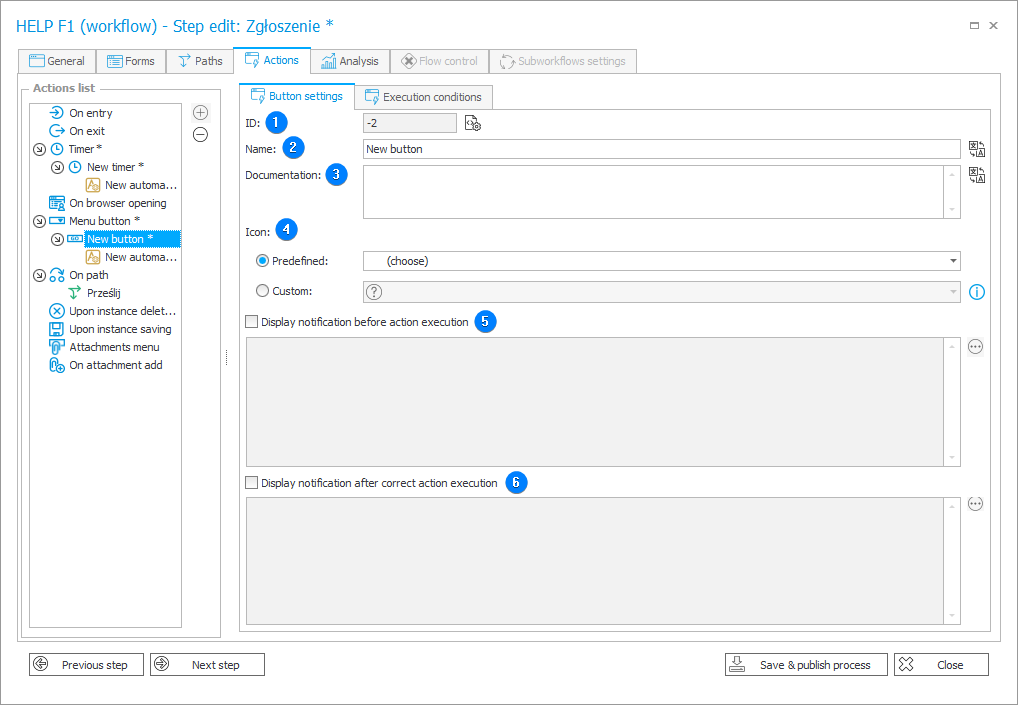
1. ID
After saving the process, new element has correct, unique ID.
2. Name
Button name displayed on the form.
3. Documentation
Optional field. It can describe how a new button works.
4. Icon
Icon displayed next to the button name in WEBCON BPS Portal. Available options:
- Predefined – you can select an icon from the predefined collection,
- Custom – enter icon name available in the definition of the FabricMDL2Icons font.
5. Display notification before action execution
Selecting the checkbox allows you to enter a message displayed before executing an action.
6. Display notification after correct action execution
Selecting the checkbox allows you to enter a message displayed after executing an action.
Execution conditions
The tab allows you to restrict the menu button availability and define form rule to be executed after pressing the button and before the action is executed.
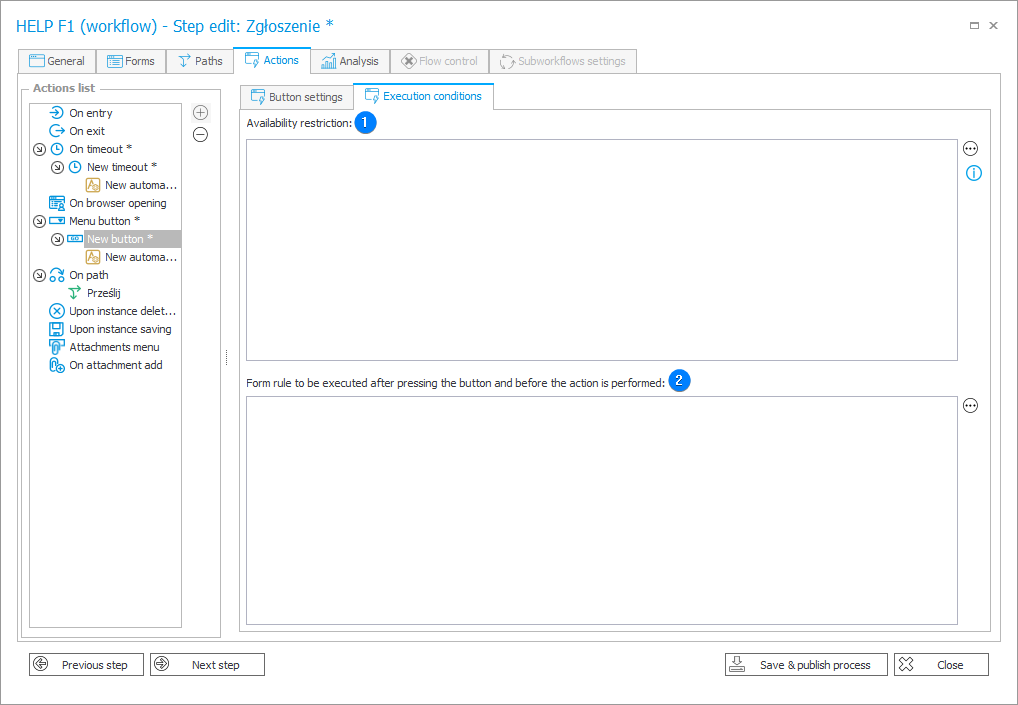
1. Availability restriction
The option allows you to create a rule defining availability of the button.
For example, for the Printout a barcode label action button, the rule restricts the button visibility to stations or users defined in the document entry point.
2. Form rule to be executed after pressing the button and before the action is performed
The field allows you to enter a form rule executed before triggering an action.